
How to Write a CV: Guide With Template, Examples, & Tips

Kickstart your job search by learning how to write a CV the right way, with CV templates, examples, tips, and advice tailored to specific roles.
Updated:
|

15 min read

Table of Contents


Between escalating competition, long hiring processes, ghost jobs, and job market uncertainty, today’s job applicants need an edge if they hope to break through the noise and reach recruiters and hiring managers. Knowing how to write a CV correctly can mean the difference between success and failure for any job candidate.
This guide will teach you how to make a CV from start to finish, including:
- The difference between a CV and a resume
- How to structure each CV section
- CV formatting tips and best practices
- A CV template, plus a CV example
- How to tailor your CV for different roles
- Common CV mistakes and expert tips
What Is a CV?
A CV is short for curriculum vitae, which is a detailed document that outlines your full academic and professional history. CV expectations vary by country, so content, length, and formatting norms may differ depending on where you’re applying. CVs are most commonly used for academic, research, medical, or scientific roles, as well as for jobs outside the United States and Canada.
In many cases, a CV is submitted alongside a cover letter that explains your background, research interests, or professional goals in more detail.
CV vs Resume: What’s the Difference?
While the terms “CV” and “resume” are sometimes used interchangeably, they aren’t the same thing.
Here’s how they differ:
- Length: A resume is usually 1–2 pages, while a CV can be 6–12 pages or more, depending on your experience.
- Purpose: Resumes are tailored for specific jobs and focus on relevant skills and achievements. CVs are designed to present a complete history of your academic and professional work.
- Location and industry use: Resumes are standard for most non-academic jobs in the U.S. and Canada, whereas CVs are commonly required for academic and research positions and are often preferred internationally as the primary job application document.
A CV typically includes:
- Contact information
- Professional summary
- Education history
- Work experience
- Professional skills
- Publications and presentations
- Awards and honors
- Professional affiliations
- Personal interests (optional)
How to Write a CV in 8 Steps
Follow these eight steps to learn how to craft a CV that clearly communicates your qualifications and experience.
- Step 1:
Add a Header With Your Contact Information
Dorem ipsum dolor sit amet, consectetur adipiscing elit. Nunc vulputate libero As in a resume, the top line of a CV should contain your basic contact information. Include your full name along with your current phone number and email address. If relevant, you can also add your professional website URL or online portfolio link.
Example CV header:
Jane Smith999-444-3333 | janesmith@gmail.com | janesmith.com
- Step 2:
Write Your Professional Summary
Your professional summary appears at the top of your CV and allows you to introduce yourself to the hiring team in one to four sentences. In this mini-bio, focus on highlighting your most important qualifications for the role, industry, and career that you’re targeting. You should also mention what type of position, setting, and organization you prefer.
Example CV professional summary:
Professional SummarySales and marketing manager with over 3 years of experience in digital sales and marketing seeks to bring creative problem-solving and leadership skills to a marketing manager role at a Big Tech company in a fast-paced environment. Proven ability to increase web traffic by 50% through SEO and social media strategies. Expertise in managing multichannel campaigns to support company growth, backed by a bachelor’s degree in sales and marketing.
- Step 3:
Detail Your Education History
Like most resumes, a CV should contain details about your education. Because many academic positions specifically require a CV, the section describing your educational history should be more robust in a CV.
List the most recent academic degree you’ve earned, and continue in reverse chronological order for any subsequent degrees. Also include any degrees you’re currently pursuing.
For each entry, include these details:
- Degree type
- Graduation date (or expected date; include only if you graduated recently)
- Institution name and location
- GPA (optional unless required; include only if it’s 3.5 or higher)
- Academic honors, thesis, or dissertation
Example CV education history:
EducationMaster of Business Administration (MBA) | June 2024
Stanford University | Stanford, CA- Thesis: “AI’s Influence on Supply Chain Optimization”
Bachelor of Arts (BA) in Economics | May 2023
University of Michigan | Ann Arbor, MI- Honors: Phi Beta Kappa, summa cum laude
- GPA: 4.0
- Step 4:
Describe Your Work Experience
Your CV should include a detailed work experience section with roles listed in reverse chronological order, including internships and volunteer work. Add two to three bullets per position that highlight key achievements, using strong action verbs and numbers when possible.
Example CV work experience:
Marketing Assistant
Innova Tech, San Francisco, CA | June 2022–Present- Supported 11 successful client campaigns through market research.
- Increased social media engagement by 20% through targeted campaigns.
- Analyzed web traffic data to identify 5 key engagement trends.
- Step 5:
List Your Relevant Skills
A CV skills section is just as important as a resume skills section. Use the job description as a guide to determine which of your professional skills the hiring manager is looking for.
Some skills that might be relevant to specific opportunities or occupations include:
- Hard skills, such as cloud computing, programming languages, and technical writing
- Soft skills, such as attention to detail, problem-solving, and time management
- Transferable skills, such as adaptability, conflict resolution, and digital literacy
- In-demand skills, such as AI and machine learning, data analysis, and critical thinking
Example CV skills section:
Skills- Technical: Google Analytics, Salesforce, Microsoft Office
- Interpersonal: Communication, collaboration, conflict resolution
- Management: Customer relationship management, project management, budget tracking
- Languages: English, Spanish
- Step 6:
Include Publications & Presentations
CVs are often used to apply for academic and research positions, so they should include all of your completed publications and presentations, as well as any upcoming ones. List these in reverse chronological order.
This section can contain:
- Peer-reviewed journal articles you’ve written for or contributed to
- Books and book chapters you’ve authored or coauthored
- Research reports and theses
- Online publications
- Industry conference lectures and presentations
- Panelist appearances
- Keynote speeches
- TEDx Talks
Format your list of publications using common citation guidelines, such as MLA or APA style. For presentations, include the presentation title, event name, location, and event date.
Example CV publications and presentations:
Publications- Reed, J. (2022). The Impact of Social Media on Business Marketing. Journal of Business Technology, 12(3), 112–128.
- Reed, J. (2021). Advanced AI Techniques. Journal of Data Science, 8(1), 45–60.
- Reed, J. (Forthcoming). Ethical Conundrums in Machine Learning. AI & Society Review.
Selected Conference Presentations
- Reed, J. (2023, October). Challenges in Predictive Modeling. Invited Keynote, Dreamforce, San Francisco, CA.
- Step 7:
Add Awards & Honors
Include any professional, academic, volunteer, military, or personal awards and honors on your CV, listing them in reverse chronological order. Focus on awards that relate to your role or highlight leadership, innovation, or strong performance. Include grants, scholarships, or fellowships here or in a separate section if you have several.
Other types of awards may include:
- Employee or volunteer of the month/year
- Sales, project, or top performer awards
- Awards from professional associations
- Service excellence awards
- Leadership recognition
- Technical competition or hackathon wins
- Inclusion on prestigious lists (e.g., Forbes 30 Under 30 list)
- Dean’s List, Latin honors, and inclusion in honor societies (e.g., Phi Beta Kappa)
Example CV awards and honors:
Awards & Honors- Fulbright Scholar (2024)
- Dean’s List, University of Tennessee (2020–2022)
- National Bioscience Foundation Graduate Research Fellowship (2021–2023)
- Best Innovative Research Award, Annual Chemistry Symposium (2022)
- Step 8:
Consider Optional Sections
Including additional sections related to your accomplishments or personal interests, particularly if relevant to a particular role, can give you a connection point with a recruiter, hiring manager, or others on the hiring team.
Consider adding these optional sections:
- Professional memberships
- Certifications and trainings
- Community service
- Consulting work
- Conference attendance
- Fieldwork
- Study abroad experience
- Scholarships, fellowships, or grants (if you didn’t include them under awards and honors)
- Personal interests and hobbies
Example CV personal interests section:
Interests: International Travel, Puzzles, Guitar, Marathon Running, Cooking
Quick Tips: Formatting & ATS-Friendly CV Best Practices
As you learn how to make a CV, keep these formatting pointers in mind, which address both ATS-friendly formatting and general visual appeal for human reviewers.
- Consistency: Use the same font, spacing, bolding, and date format throughout your CV to give it a clean, cohesive look.
- Font selection: Use professional, easy-to-read resume fonts, such as Arial, Calibri, Times New Roman, or Garamond.
- Font size: Use clear header size differences to create visual hierarchy. For instance, set body text to 11- or 12-point font, subheadings to 14-point font, and section headings to 16-point font.
- Graphics and formatting: Avoid busy graphics, tables, text boxes, or complex columns that can confuse ATS software.
- Margins: Use standard 1-inch margins on all sides of your CV pages.
- Keywords: Include relevant keywords exactly as they appear in the job description to improve ATS matching.
- Headings: Use conventional section labels, such as “Work Experience,” “Education,” and “Skills.”
- File type: Submit your CV in the file format requested by the employer (e.g., .DOCX or PDF).
CV Template
Now that you know the basics of how to write a good CV, use the template below to draft and customize your CV for the job you want.
CV Example
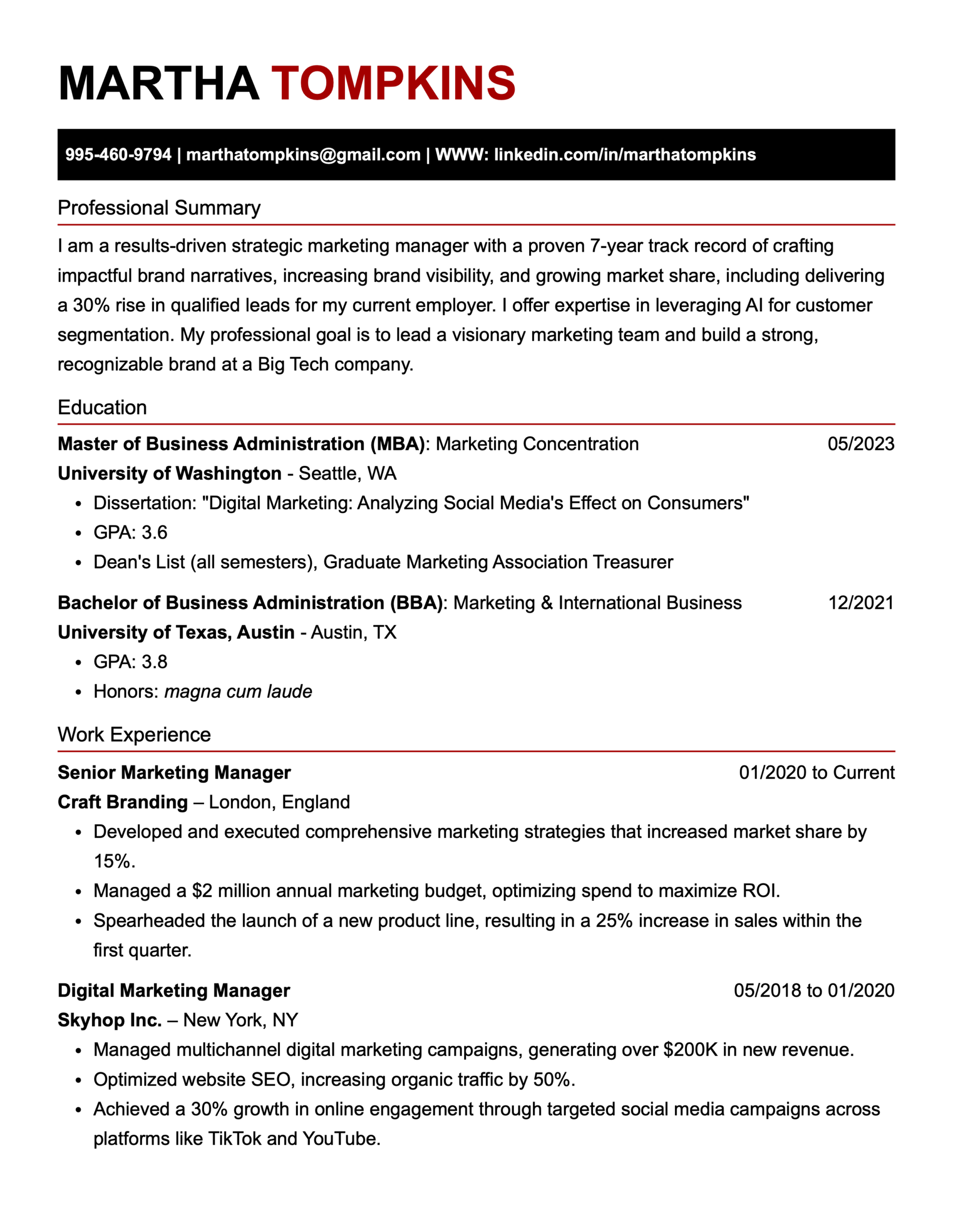
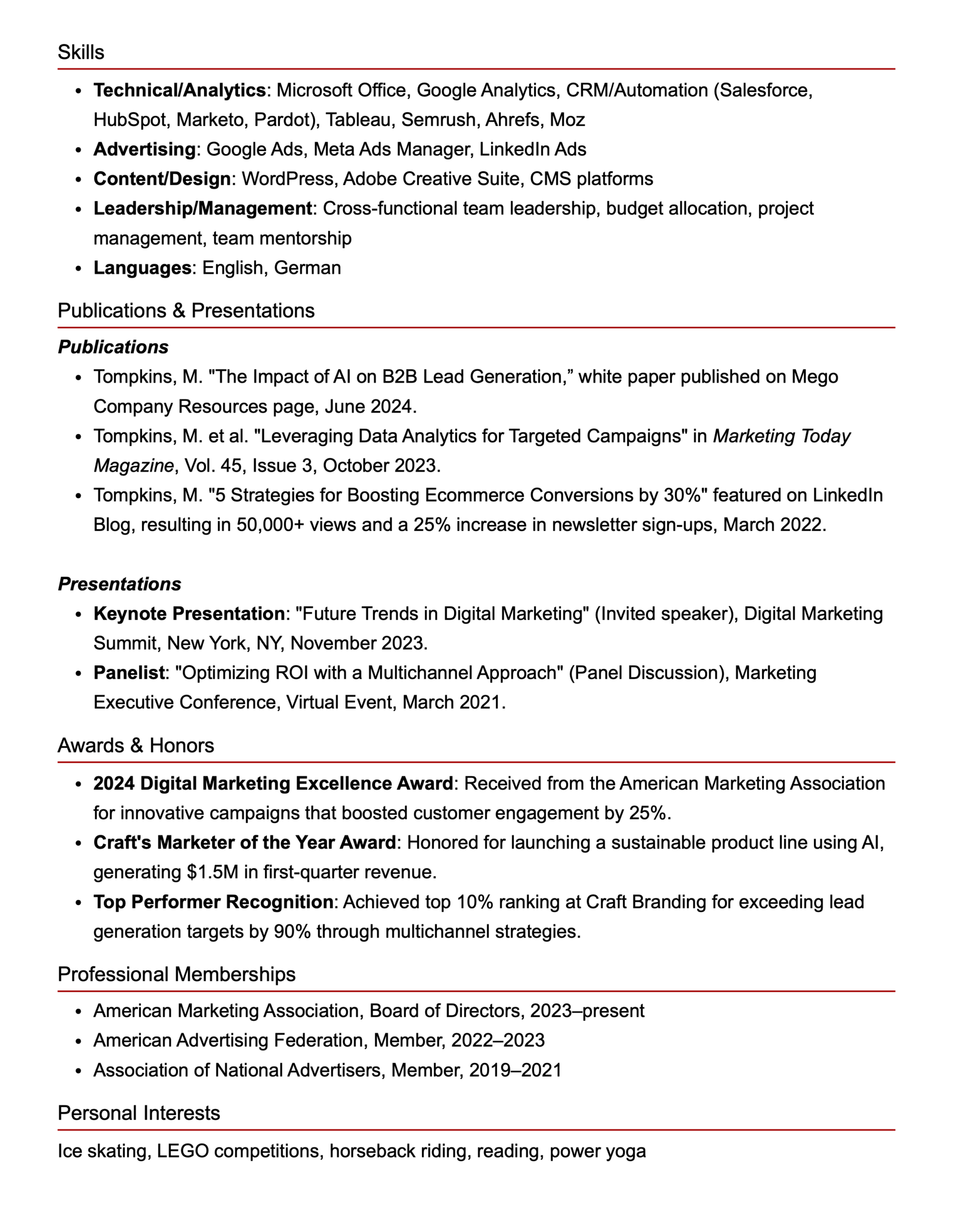
Here’s a detailed example of a CV for a marketing manager:
Customizing Your CV for Different Contexts
A CV can be adapted for many opportunities, from academic and research roles to international positions. The key is to adjust your content, structure, and emphasis to align with the language and priorities of each role and its job description.
Below, you’ll find practical ways to tailor your CV for three common contexts.

Academic Positions
To customize your CV for an academic job, tailor relevant sections like teaching, education, and research to mirror the specific role you’re applying for. Use keywords from the job ad, highlight relevant coursework and skills, and organize your CV sections to emphasize strengths for the institution you want to work at.
Strategically highlight your work experiences to show how they directly relate to the challenges a specific academic program is facing. By doing so, you’ll show the hiring team you’re a strong institutional fit and boost your chances of a successful job match.

Research Roles
Customize your specific research-related skills to match the language in the job description. You can also reorder elements in your CV to place research experience, interests, and skills higher up on your CV.
Consider crafting a dedicated “Research Skills” section with relevant subcategories, such as lab techniques, data analysis, AI, and computer skills. Quantifying your impact in your work experience section is even more important for a research role, so include numbers, percentages, and metrics to prove the outcomes and scale of your work.

International Applications
For international jobs, you must showcase your international experience clearly in your professional summary and work experience sections. Localize your CV’s content as needed, paying particular attention to elements like language proficiency and visa status.
Additionally, you should research your target country’s norms, including:
- Photos: Some countries require CV photos, while others discourage them. Check local norms before including a photo.
- CV length: Different countries have their own requirements about the number of pages to include in CVs.
- Personal details: In some countries, birth dates and/or marital status are expected on CVs.
- Language: If you’re submitting a CV in the local language, translate accurately and use localization tools. Add Common European Framework of Reference for Languages (CEFR) levels for languages.
Common Mistakes & Pro Tips
Learning how to write a strong CV takes time. Avoiding common mistakes and following a few proven best practices can help you create a CV that’s clear, polished, and easy for employers to evaluate.
3 Common CV Mistakes
Here’s how to avoid some typical errors that trip up many job seekers:

Including outdated information: A CV should be comprehensive but not exhaustive, so remove roles older than 15 years along with outdated tools, software, or skills that are no longer relevant.
Using poor formatting: Inconsistent fonts, spacing, or layouts can hurt readability and ATS performance, so avoid cluttered designs, columns, and decorative graphics.
Missing key components: Make sure your contact details are current, your summary highlights key qualifications, your experience shows measurable results, and your content is tailored to each role.
3 Pro Tips for CV Writing
Here are some pro tips on how to write a CV that can help you get called in for job interviews:

Proofread: Always proofread your CV before submitting it, as spelling errors, grammar issues, typos, and inconsistent spacing can make it look careless or unprofessional.
Get feedback: Ask a friend, mentor, colleague, or industry expert to review your CV, since fresh eyes can catch errors and gaps you may miss.
Keep it updated: Update your CV regularly to add new achievements, remove outdated skills, and include measurable results as your experience grows.
Learning How to Write a CV Can Land You a Job
Crafting a strong CV can make the difference between getting the job you want and not. Review the eight steps above, use the CV template and CV examples, and follow expert formatting guidance to set yourself up for job search success.
Once your CV is polished, you can easily adapt it into a tailored resume using a resume builder. Monster’s Resume Builder makes it simple to create multiple versions for different roles, highlight your most relevant experience, and optimize your application for ATS software.

Megan Dawkins is a career industry editor who empowers job seekers to take control of their career paths using Monster’s comprehensive job search and resume tools. She specializes in helping job seekers navigate the flexible job market.
See More From Megan DawkinsExplore Related Career Advice

Cashier Career Paths: Monster Workforce Mobility Report (Volume 2)

Updated:
Oct 19, 2026
|
9 min read

Highest Paying Medical Jobs: 35 Top Healthcare Careers by Salary

Updated:
Oct 16, 2026
|
18 min read

How to Ask for a Raise at Work: Steps, Scripts, & Email Templates
Updated:
Oct 15, 2026
|
20 min read

Job Hugging Statistics: Nearly 9 in 10 Workers Have “Hugged” a Job
Updated:
Oct 13, 2026
|
9 min read

Nearly 3 in 10 LinkedIn Users Have Updated a Past Job After Leaving It
Updated:
Oct 7, 2026
|
7 min read

Employee Loyalty Statistics: 90% Say Companies Expect More Than They Give
Updated:
Oct 5, 2026
|
7 min read


Overqualified Hiring Stats: 57% Would Cut Resume Experience to Get Hired
Updated:
Sep 28, 2026
|
9 min read

20 First Job Interview Questions & Sample Answers: Tips to Land Your First Job
Updated:
Sep 24, 2026
|
20 min read
Manage Your Career Like an Expert
Take control of your professional journey with Monster’s expert resources. Explore advice, research, and tips to make informed decisions and advance your career with confidence.

Job Search
Discover strategies to get noticed, network effectively, and streamline your job search process.

Resumes
Get practical tips to create a resume or CV that stands out to employers and wins interviews.

Cover Letters
Learn how to craft a compelling cover letter that highlights your experience and fit for the role.

Career Paths
Explore career paths, industry trends, and growth opportunities to plan your next move.

Interviewing
Prepare for interviews with tips on answering common questions and following up effectively.

Career Development
Develop key skills and knowledge to grow in your current role or pivot to new opportunities.

Leaving a Job
Navigate job changes and career transitions with practical advice and planning resources.