
Bad Resume Examples: 8 Mistakes & How to Fix Them

See examples of the worst mistakes that get resumes rejected and learn how to fix them before you apply.
Updated:
|

16 min read

Table of Contents


A bad resume can quietly cost you interviews before you ever get the chance to make your case. From cluttered layouts to vague descriptions and oversharing, these missteps can leave a big impression on hiring managers—and not in a positive way.
In this article, we’ll share bad resume examples to show what not to do, explain why these resumes fall short, and offer practical tips to help you avoid the same pitfalls. By learning from these mistakes, you can build a resume that’s clear, compelling, and ready to get noticed for the right reasons.
1. The Spelling & Grammar Disaster
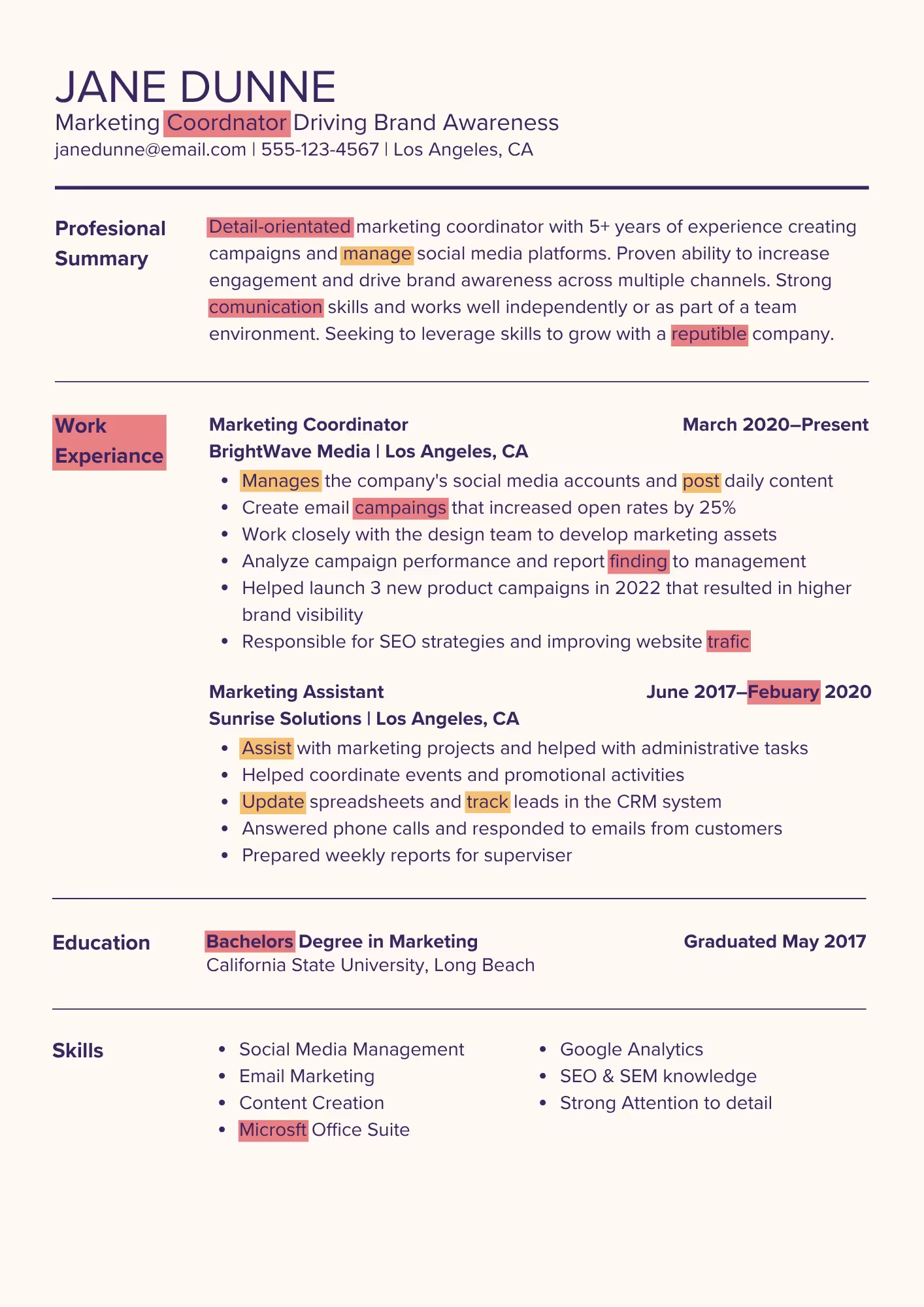
The resume below is a textbook example of how spelling and grammar mistakes can sink an application. From the resume headline to the bullet points, errors appear so frequently that they overshadow the candidate’s experience and qualifications.
Why This Resume Gets Rejected
Inconsistent verb tenses (highlighted orange) and misspellings (highlighted red) immediately raise red flags. When a hiring manager spots errors like these, it can lead to doubts about the candidate’s professionalism and attention to detail.
If your resume isn’t carefully proofread, employers may assume the same lack of care would show up on the job. Even a few small mistakes can distract from your skills and achievements, pulling focus away from your job-relevant experience.
How to Fix It
A clean, error-free resume doesn’t just look better—it builds trust. When your content is polished and precise, hiring managers can focus on your skills and qualifications.
When you’re writing a resume, follow these tips to avoid spelling and grammar mistakes:
- Proofread in stages. Review your resume multiple times, focusing on one issue per pass, such as spelling, grammar, and word choice.
- Read it out loud. Hearing your resume helps you catch awkward phrasing, missing words, repeated terms, or bullet points that don’t flow or sound natural.
- Check for consistent structure. Make sure bullet points follow the same pattern so your resume reads smoothly, using action verbs in the correct tense to start each bullet.
- Use spellcheck, but don’t rely on it alone. Automated tools might miss wording issues or errors in proper nouns like job titles, company names, and software skills.
- Get a second set of eyes. Ask a trusted friend or peer to review your resume specifically for grammar, spelling, and clarity.
2. The Unprofessional Formatting Nightmare
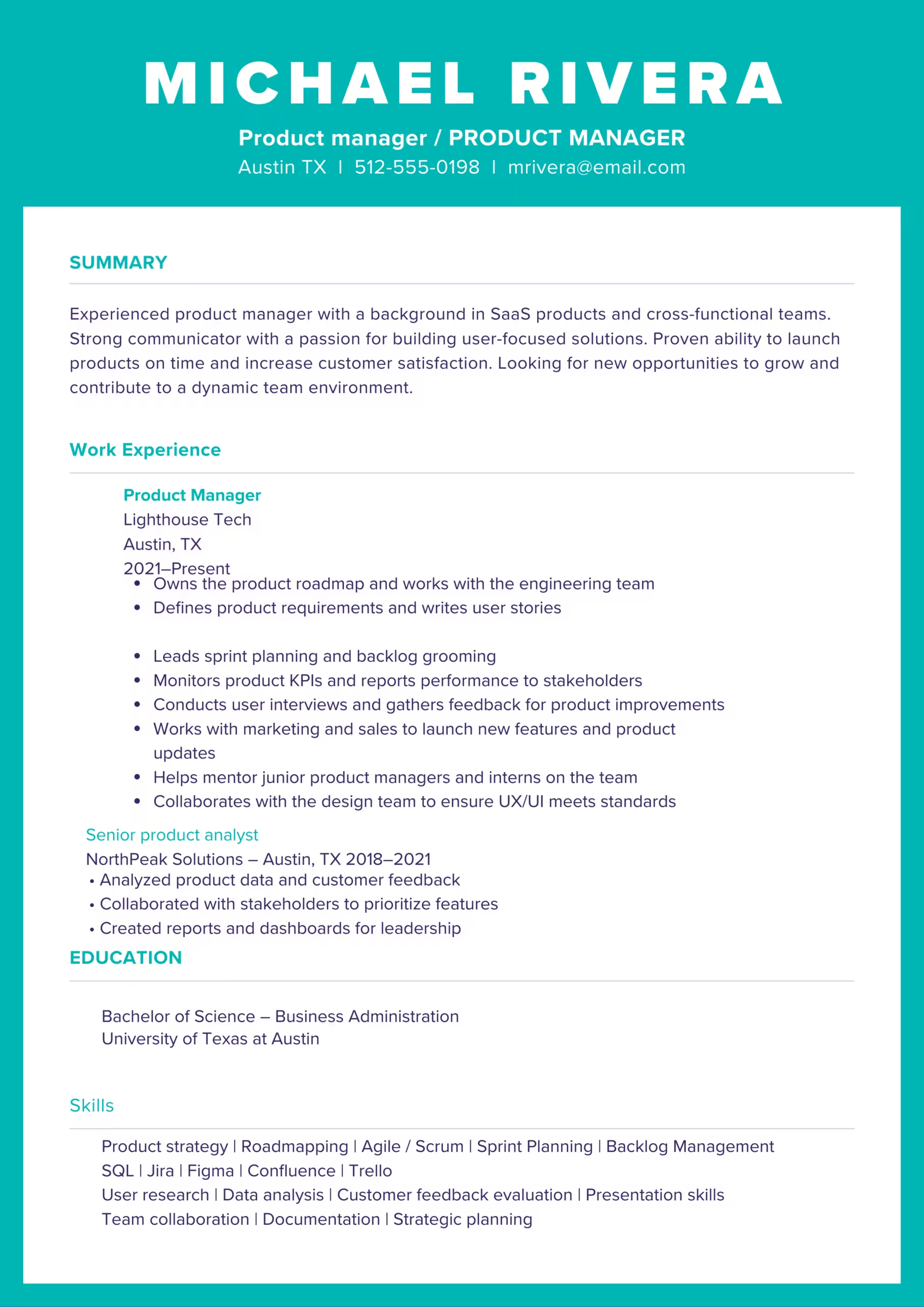
Some of the worst resume examples show that inconsistent spacing, mismatched fonts, and cluttered sections create a confusing layout that distracts from the candidate’s qualifications.
Why This Resume Gets Rejected
Hiring managers often spend only seconds reviewing each resume, and messy layouts like the one above can cause them to move on before reading the content.
Notice how the headings vary in style, the spacing between sections is inconsistent, and the bullet points don’t follow a uniform structure. The skills section is also crowded and unevenly spaced, which makes it harder to identify key strengths at a glance.
These inconsistencies signal poor attention to detail. If you don’t organize your resume clearly, employers may worry about your ability to communicate information effectively on the job.
How to Fix It
A well-formatted resume improves readability and helps hiring managers quickly identify your most important qualifications. Clean, consistent formatting shows professionalism and strong organizational skills, which are important for any job.
When formatting your resume, follow these best practices:
- Maintain consistent spacing. Use equal spacing between sections, job entries, and bullet points to create a balanced, easy-to-read layout.
- Align content properly. Make sure job titles, company names, dates, and locations follow a consistent alignment pattern so information is easy to scan.
- Standardize bullet points. Use the same bullet style and formatting throughout your resume, and keep bullet points similar in length and structure.
- Use white space strategically. Avoid overcrowding your resume by leaving sufficient space between sections and margins to improve readability.
- Preview your resume on different devices. Check how your resume appears when saved as a PDF and viewed on desktop and mobile screens to ensure clean formatting.
3. The Graphic Design Mishap
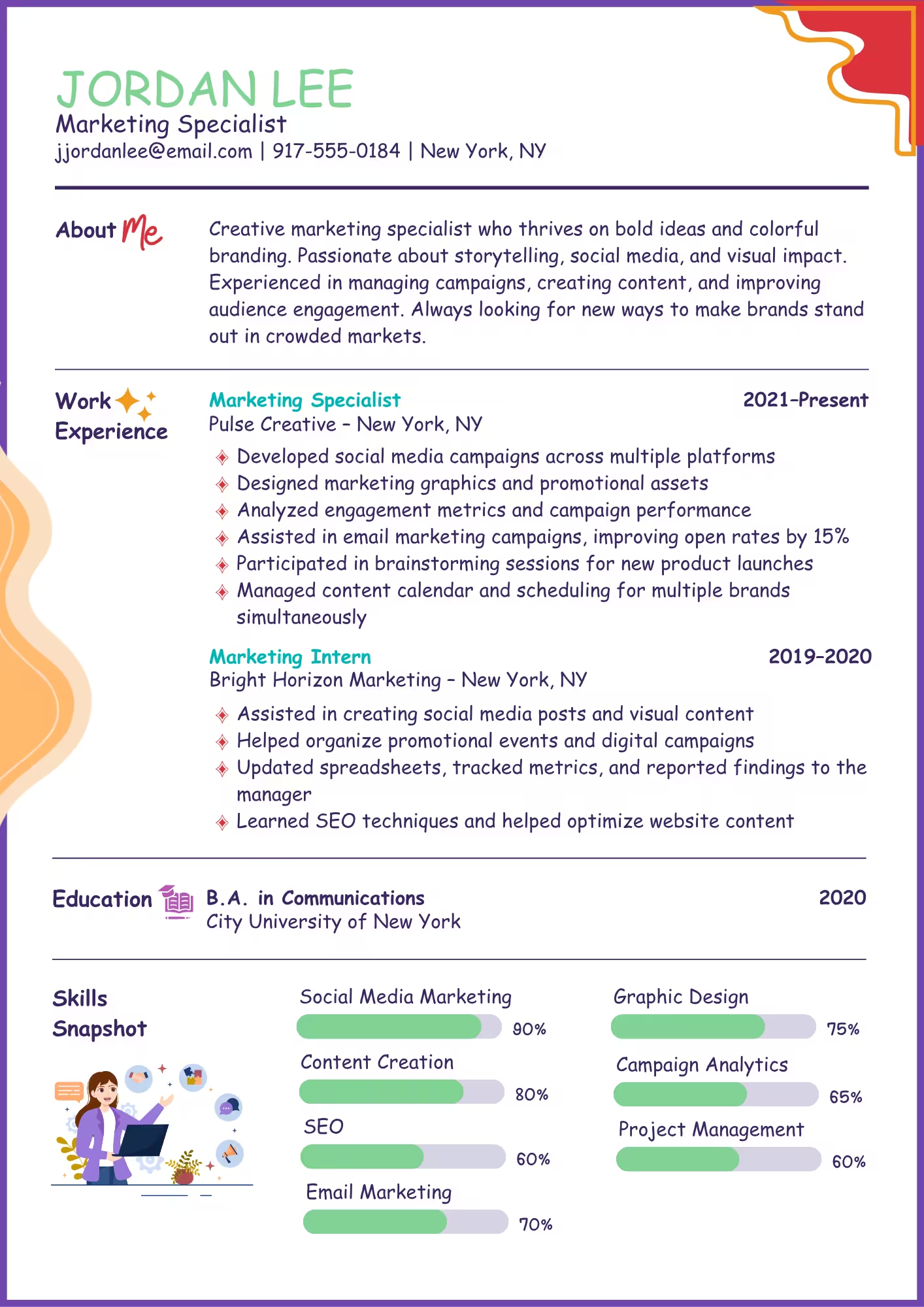
A common theme in terrible resume examples is distracting design choices that overshadow otherwise relevant experience. The example below shows how bright colors, decorative fonts, and infographic-style elements can make a resume difficult to read.
Why This Resume Gets Rejected
The bright colors, Comic Sans font, icons, and skill bars make this resume visually overwhelming. Instead of guiding the reader through the content, the design pulls attention away from key qualifications and slows down scanning.
These elements can also cause serious technical problems. Applicant tracking systems (ATS) often struggle to parse text embedded in graphics, charts, or decorative layouts.
As a result, important information like skills or job titles may be misread or ignored entirely, reducing the resume’s chances of reaching a human reviewer.
How to Fix It
Effective resume design should support readability and clarity. Simple formatting helps both hiring managers and ATS software understand your experience and fit for the role.
Consider these resume tips for avoiding graphic design mishaps:
- Skip infographic-style elements. Replace charts, icons, and skill bars with plain text that ATS systems and hiring managers can easily read.
- Limit color usage. Use black text with one subtle accent color at most to keep your resume design clean and professional.
- Avoid text embedded in graphics. All critical content should be written in plain text so that ATS software can easily parse your information.
- Use standard fonts and consistent sizes. Use a professional font rather than a decorative one and ensure consistent font sizes for headings and body text.
- Preview for ATS compatibility. Save your resume as a simple PDF or Word file and confirm the text remains selectable and readable.
4. The Buzzword Overload
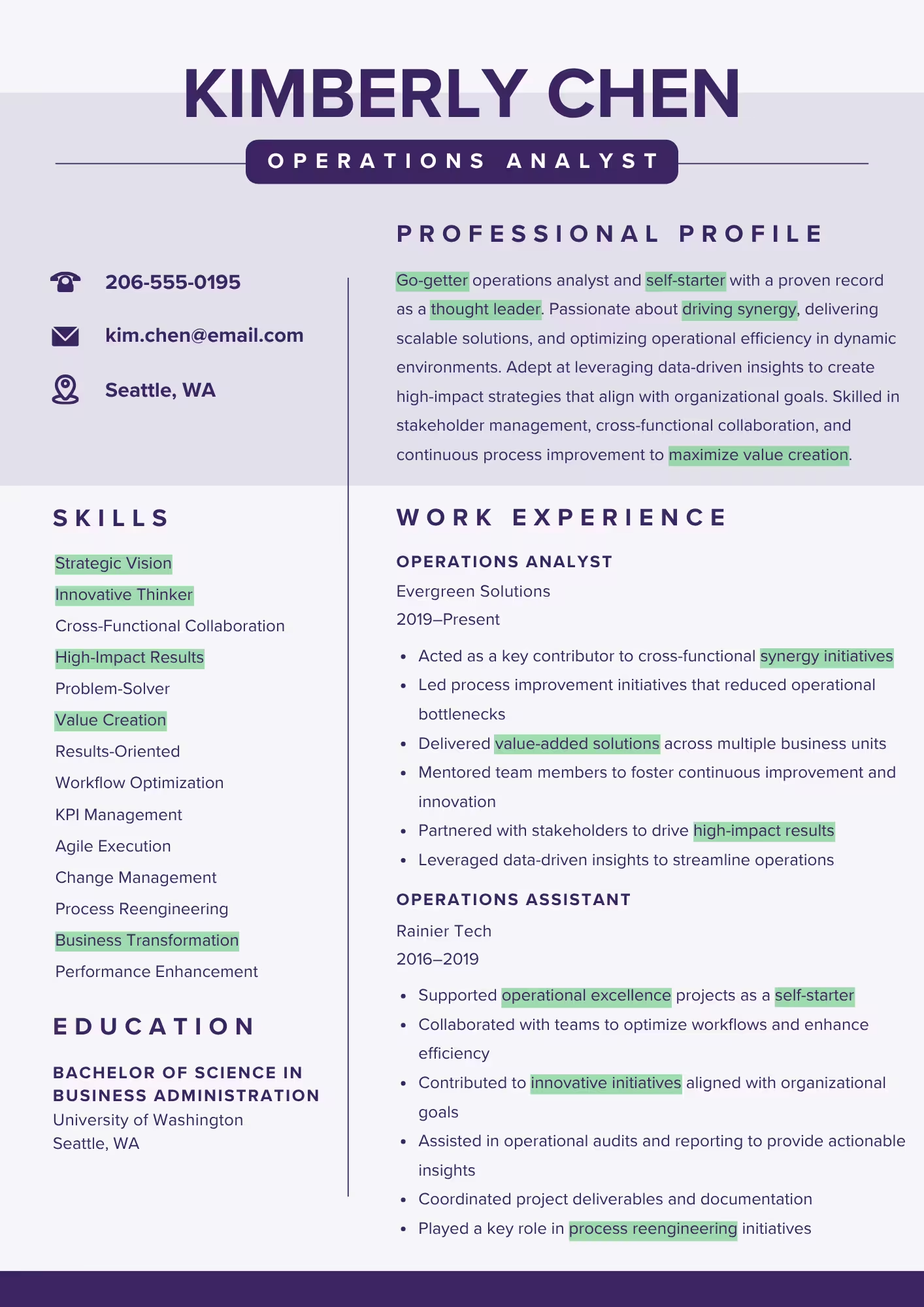
The example below is packed with resume buzzwords that may sound impressive at first glance, but ultimately don’t provide a clear picture of the candidate’s relevant experience.
Why This Resume Gets Rejected
Buzzwords alone don’t communicate meaningful accomplishments. Terms like “go-getter,” “self-starter,” “thought leader,” and “synergy” sound enticing, but they don’t reveal anything about the candidate’s measurable accomplishments and experience.
A resume overloaded with buzzwords can come across as empty or inflated. Even a highly qualified candidate risks blending into a pile of similar-sounding applications if every bullet point reads like a slogan instead of a concrete accomplishment.
How to Fix It
Strong resumes replace generic buzzwords with clear actions, measurable results, and relevant keywords. This makes your achievements visible to both hiring managers and ATS software.
Follow these essential tips to avoid buzzword overload:
- Be specific about contributions. Explain how you improved processes, led projects, or solved problems, rather than adding buzzwords without examples to back them up.
- Use concrete action verbs. Replace vague descriptors like “go-getter” or “thought leader” with examples and action verbs like “achieved,” “led,” or “implemented.”
- Incorporate job-specific keywords. Instead of non-specific buzzwords, incorporate keywords from the job posting, such as skills, tools, certifications, and industry terms.
- Test readability. Ask someone outside your field to read your resume and summarize what you accomplished. If they struggle to explain your achievements or don’t notice your key skills, revise for clarity and specificity.
- Cut empty modifiers. Remove generic terms like “results-oriented” or “highly motivated” that don’t convey tangible work or measurable impact.
5. The Long Autobiography
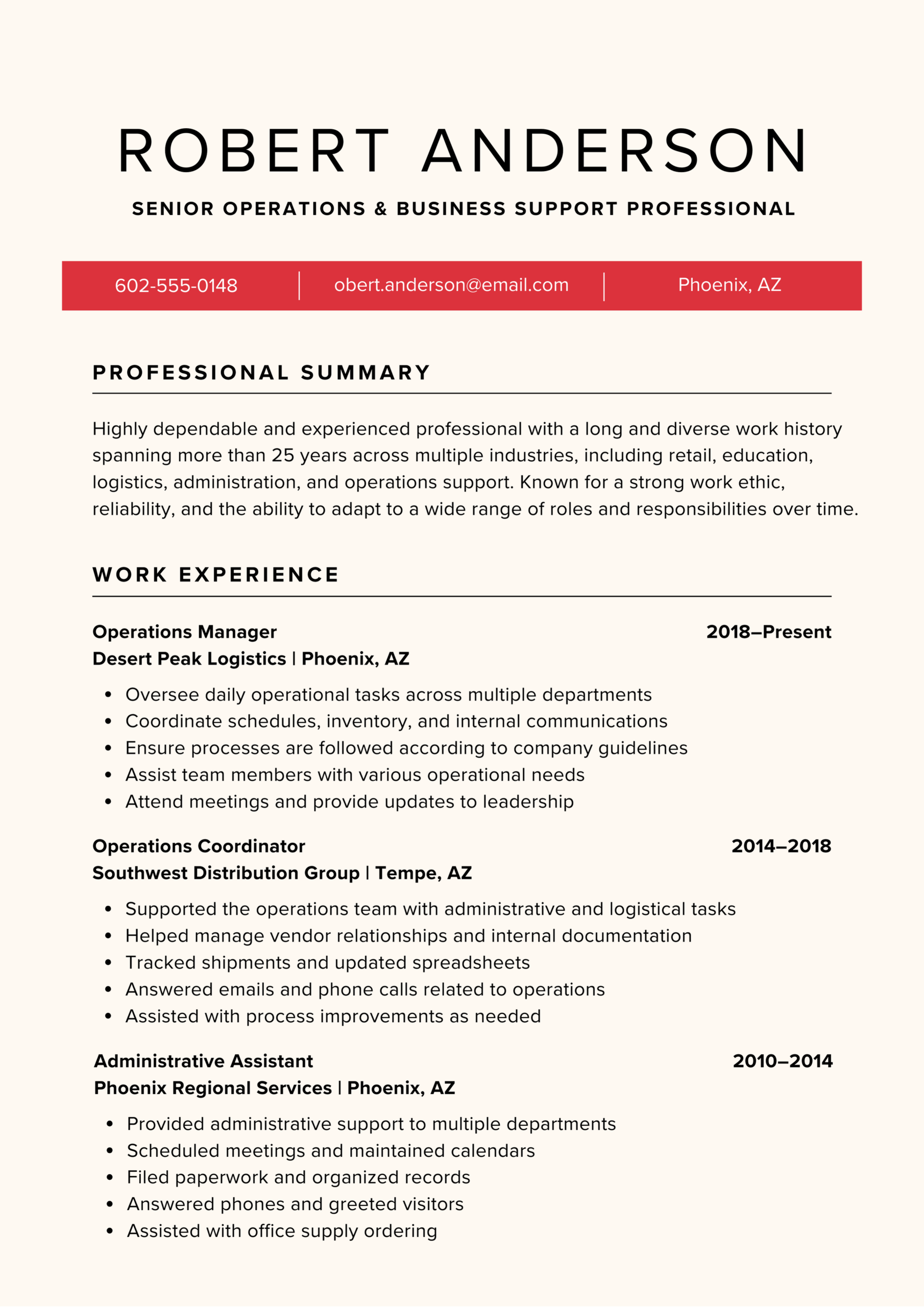
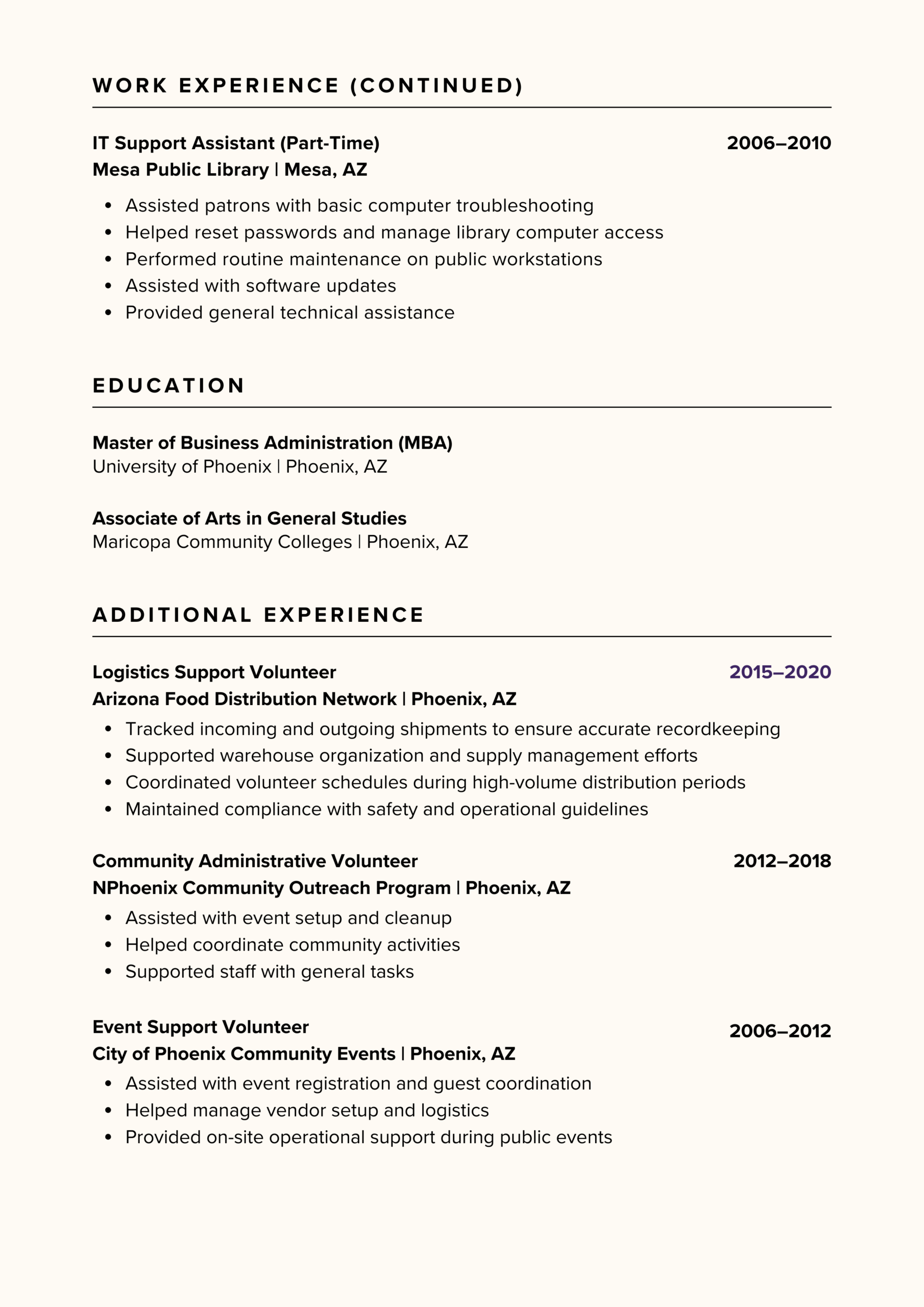
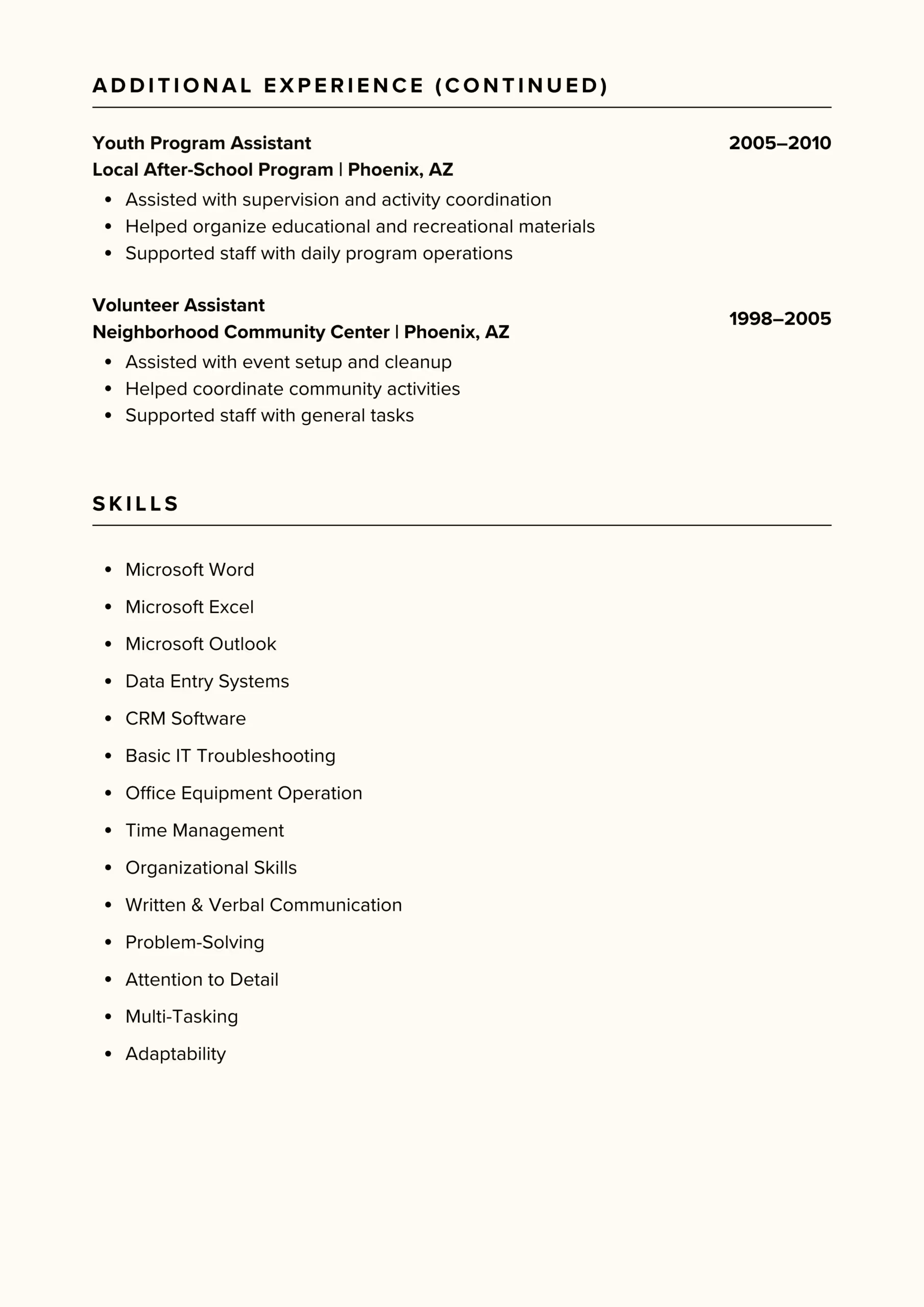
This resume includes irrelevant roles from early in the applicant’s career, making it unnecessarily long and difficult to read. This approach buries key experience under distracting details and excessive content that most hiring managers won’t read.
Why This Resume Gets Rejected
This resume spans three pages and includes irrelevant jobs from over 20 years ago. Listing every past position makes it difficult to identify the candidate’s current, relevant skills.
Older or unrelated positions, such as grocery store clerk work or library IT support from decades ago, dilute the resume’s impact and distract from the skills and accomplishments that matter.
How to Fix It
For most job seekers, a one- to two-page resume is sufficient. Entry-level and mid-level candidates should opt for one page, while more experienced professionals can use two pages.
Follow these best practices to create a concise, focused resume:
- Highlight recent accomplishments. Focus on roles and measurable achievements from the last 10 to 15 years, where your experience is most current and impactful.
- Prioritize relevant experience. Only include positions that demonstrate skills, achievements, or knowledge directly related to the job you’re applying for.
- Summarize older roles. If earlier positions are only loosely related, list them briefly with only the job title, company, and dates, skipping detailed bullet points.
- Cut outdated or irrelevant roles. Remove positions that don’t support your qualifications for the role, even if they were important earlier in your career.
6. The Non-Achiever
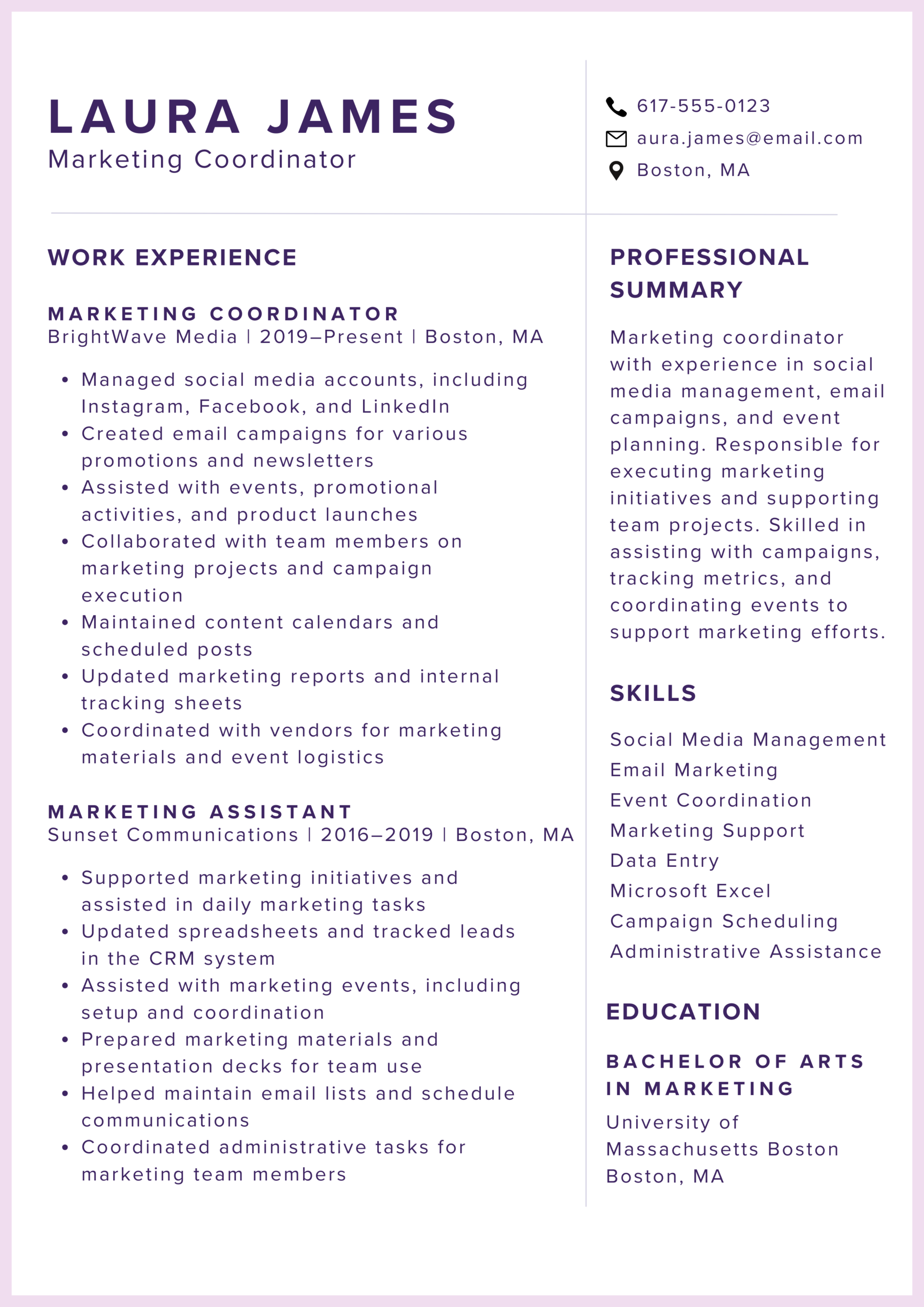
The resume example below reads more like a list of duties than a record of accomplishments. Simply describing responsibilities without showing results makes it difficult for hiring managers to understand the candidate’s true impact and value.
Why This Resume Gets Rejected
This resume lists vague responsibilities but doesn’t show any measurable achievements. Phrases like “managed social media accounts” or “assisted with events” tell hiring managers what the candidate did, but not the results of their work.
Without accomplishments, it’s difficult for hiring managers to evaluate your value or differentiate you from other applicants. Resumes that fail to highlight results can make even qualified candidates appear underwhelming in a competitive job market.
How to Fix It
Transforming a “duties-only” resume into a results-focused resume helps your contributions stand out. By focusing on what you achieved, not just what you were responsible for, you make it clear why hiring managers should take notice.
Here are the best practices to keep in mind while you create your resume:
- Start bullet points with strong action verbs. Words like “led,” “implemented,” “improved,” or “generated” signal impact immediately.
- Use metrics and numbers. Quantify results wherever possible. For example, “Increased social media engagement by 35%” or “Reduced event planning costs by 15%.”
- Focus on outcomes. Instead of just listing tasks, explain the impact your work had on the team, department, or company. For example, “Developed a content calendar that boosted engagement across three platforms.”
- Highlight promotions or recognition. Include awards, certifications, or leadership roles that demonstrate your achievements and growth over time.
- Tailor achievements to the role. Emphasize accomplishments most relevant to the job you’re applying for and remove any tasks that don’t add value.
- Combine similar tasks into single bullets. Keep your resume concise while focusing on results rather than a long list of duties.
7. The Oversharer
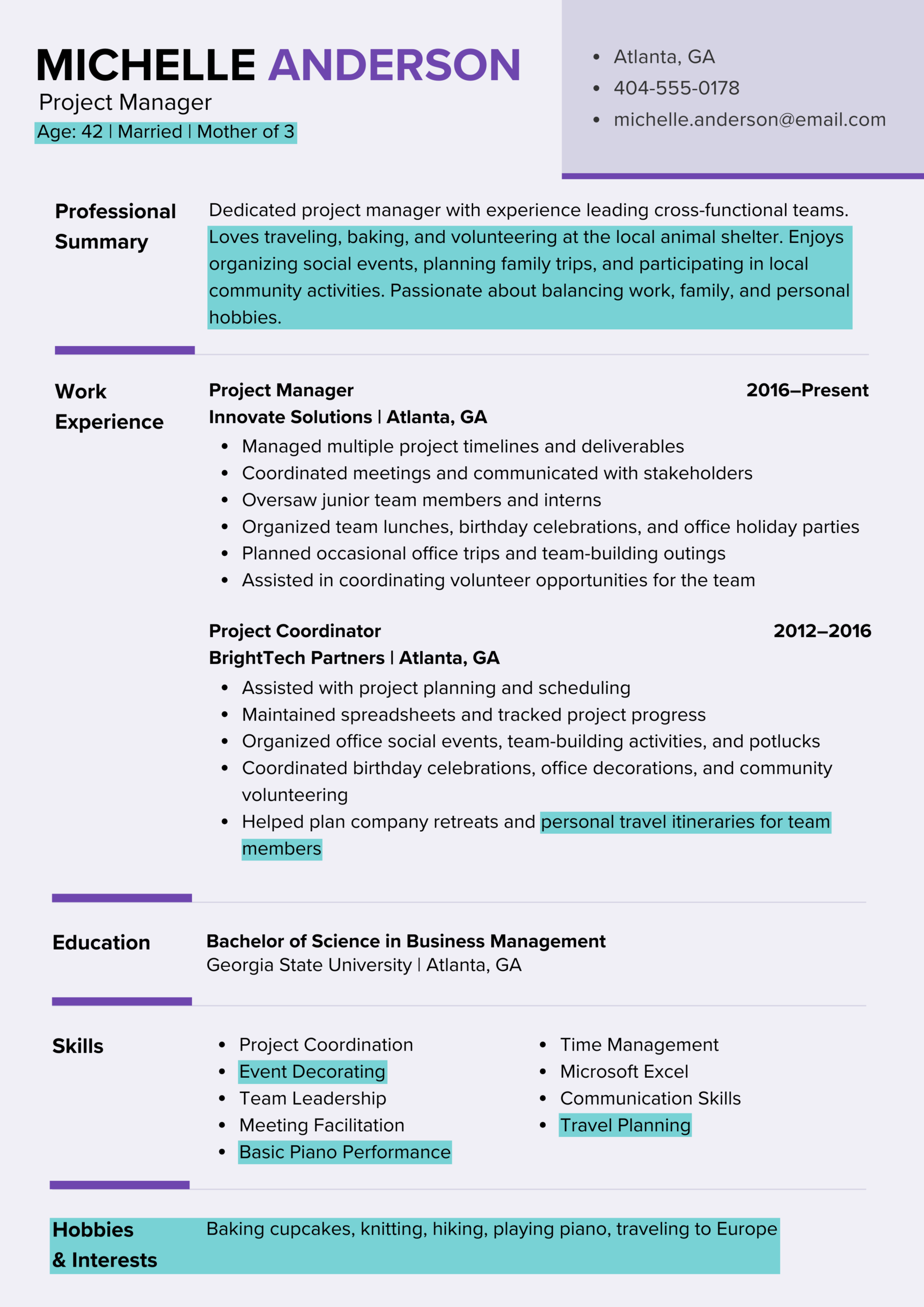
The example below includes personal information that distracts from the candidate’s relevant professional experience and weakens the overall impact of their resume.
Why This Resume Gets Rejected
Including personal details such as age, marital status, or unrelated hobbies distracts from the candidate’s professional experience.
When resumes include information that isn’t relevant to the role, valuable space is wasted that could be used to highlight skills, accomplishments, or results.
Oversharing can also make hiring managers uncomfortable or cautious, as personal details may introduce unconscious bias or legal concerns. As a result, they’ll often move on to more focused resumes that clearly present relevant experience without unnecessary distractions.
How to Fix It
A professional resume should focus strictly on relevant skills, experience, and accomplishments. You can start the writing process by creating a resume outline that lays the groundwork for the key information you want to include, which helps you stay focused on what matters most and prevents unnecessary or distracting details from creeping in.
These writing tips also help ensure your resume stays focused and relevant:
- Remove personal identifiers. Exclude details such as age, marital status, religious affiliation, or other sensitive information that doesn’t relate to job performance.
- Limit hobbies to those with relevance. Only include interests if they demonstrate transferable skills or support your qualifications (e.g., leading a volunteer coding group for a software role).
- Emphasize professional impact. Use your resume summary and work experience sections to highlight skills, achievements, and measurable results from past roles.
- Maintain a professional tone. Avoid casual language, personal anecdotes, or information you wouldn’t discuss in a job interview.
- Make every section earn its place. If a detail doesn’t strengthen your case for the role, remove it and replace it with content that does.
8. The Exaggerator
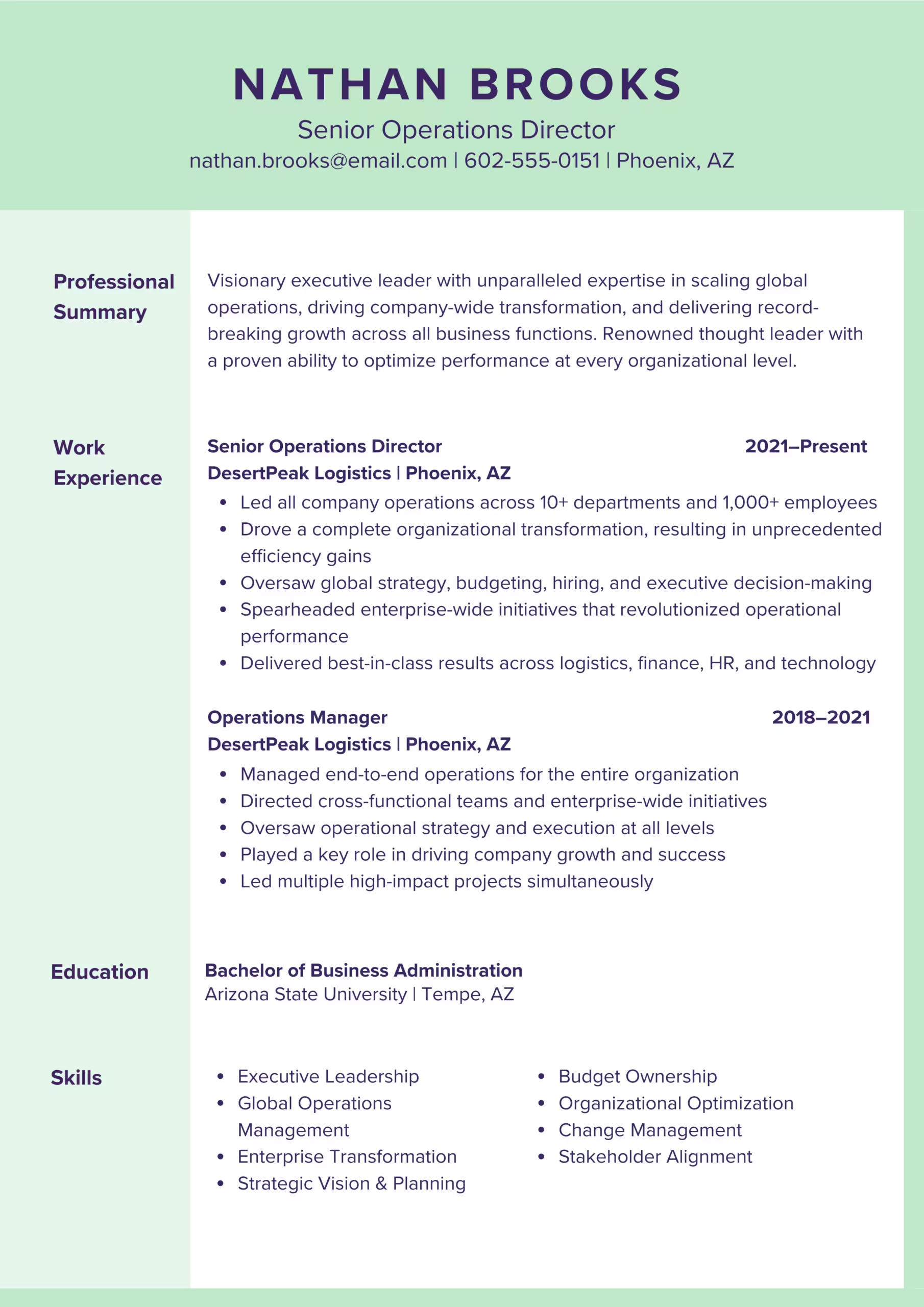
The worst resume ever is one that includes exaggerated or false information. Inflated titles, exaggerated responsibilities, or unrealistic claims may seem like a way to stand out, but often backfire once a hiring manager takes a closer look or later in the hiring process.
Why This Resume Gets Rejected
This resume raises red flags because the scope of responsibility doesn’t align with the candidate’s likely role or career progression.
Claims like “led all company operations,” “global strategy,” and “executive decision-making” are unusually broad and vague, especially without context, scale, or measurable results.
Hiring managers are trained to spot resume lies and embellishments. If titles and achievements feel inflated or unrealistic, they may question the candidate’s credibility or worry that other details on the resume are also inaccurate.
How to Fix It
Credibility matters. A resume that’s honest, specific, and well-supported builds trust and improves your chances of securing an interview.
Here are some tips and best practices to keep in mind while you write your resume:
- Use accurate job titles. Always list your official title; don’t inflate it to make your role sound more senior than it was. Accurate titles build credibility.
- Be prepared to explain. Every section of your resume should include information that you can confidently and honestly discuss during an interview.
- Be realistic about scope. Clearly specify the size of teams, budgets, or projects you actually managed, so hiring managers understand the scale of your responsibilities.
- Support claims with specifics. Pair achievements with measurable results, timelines, or tangible outcomes to make your contributions clear and verifiable.
- Avoid sweeping statements. Replace broad phrases like “oversaw all operations” with precise descriptions of the work you actually did.
Checklist of Resume Mistakes to Avoid
After reviewing these examples and common resume mistakes, it’s helpful to have a concise reference to keep your own resume on track. Use this checklist to make sure your document is professional, focused, and free from errors that could cost you interviews:

Spelling and grammar errors: Proofread in stages, read out loud, check verb tense and parallel structure, and get a second set of eyes.
Unprofessional formatting: Keep layouts clean, consistent, and easy to scan; avoid random fonts, misaligned sections, or cluttered graphics.
Distracting graphics or unusual fonts: Skip decorative fonts, bright colors, and infographic-style layouts that ATS software can’t read.
Buzzword overload: Replace vague terms like “go-getter” or “synergy” with concrete achievements and relevant keywords from the job posting.
Autobiography-length resumes: Stick to one or two pages, prioritize relevant experience, and summarize older or unrelated roles.
Duties-only descriptions: Focus on accomplishments, measurable results, and outcomes instead of just listing responsibilities.
Oversharing personal information: Remove age, marital status, unrelated hobbies, and other non-job-related or unprofessional details.
Exaggeration or inflated claims: Use accurate titles, realistic scope, specific achievements, and be ready to back up everything in an interview.
Next Steps for a Standout Resume
Keep this checklist in mind while you explore good and bad resume examples to guide your strategy. Equipped with this knowledge, you can create a resume that highlights your achievements and presents your experience clearly and professionally.
Taking the time to focus on what truly matters and avoiding the mistakes exemplified on this page will help your application stand out and win interviews.
For added support, you can use our Resume Builder, which offers step-by-step guidance and professional templates designed to help you create a polished, interview-ready resume.

Elizabeth Muenzen is a Certified Professional Resume Writer (CPRW) and member of the Professional Association of Resume Writers & Career Coaches who empowers job seekers to take control of their career paths using Monster’s comprehensive job search and resume tools.
See More From Elizabeth MuenzenExplore Related Career Advice

Cashier Career Paths: Monster Workforce Mobility Report (Volume 2)

Updated:
Oct 19, 2026
|
9 min read

Highest Paying Medical Jobs: 35 Top Healthcare Careers by Salary

Updated:
Oct 16, 2026
|
18 min read

How to Ask for a Raise at Work: Steps, Scripts, & Email Templates
Updated:
Oct 15, 2026
|
20 min read

Job Hugging Statistics: Nearly 9 in 10 Workers Have “Hugged” a Job
Updated:
Oct 13, 2026
|
9 min read

Nearly 3 in 10 LinkedIn Users Have Updated a Past Job After Leaving It
Updated:
Oct 7, 2026
|
7 min read

Employee Loyalty Statistics: 90% Say Companies Expect More Than They Give
Updated:
Oct 5, 2026
|
7 min read


Overqualified Hiring Stats: 57% Would Cut Resume Experience to Get Hired
Updated:
Sep 28, 2026
|
9 min read

20 First Job Interview Questions & Sample Answers: Tips to Land Your First Job
Updated:
Sep 24, 2026
|
20 min read
Manage Your Career Like an Expert
Take control of your professional journey with Monster’s expert resources. Explore advice, research, and tips to make informed decisions and advance your career with confidence.

Job Search
Discover strategies to get noticed, network effectively, and streamline your job search process.

Resumes
Get practical tips to create a resume or CV that stands out to employers and wins interviews.

Cover Letters
Learn how to craft a compelling cover letter that highlights your experience and fit for the role.

Career Paths
Explore career paths, industry trends, and growth opportunities to plan your next move.

Interviewing
Prepare for interviews with tips on answering common questions and following up effectively.

Career Development
Develop key skills and knowledge to grow in your current role or pivot to new opportunities.

Leaving a Job
Navigate job changes and career transitions with practical advice and planning resources.