
Europass CV: Free Template & Examples in English

Send a CV to Germany, Latvia, Poland, and Spain—all in one standardized format that helps European employers see what you bring to the table.
Updated:
|

21 min read
Table of Contents


A Europass CV is a free, standardized CV format created by the European Union (EU) to make job applications more consistent and easier to compare across Europe.
Rather than designing your own CV, you complete a structured template that presents your work experience, education, language proficiency, and skills in a format recognized by employers, universities, and public institutions across more than 35 European countries.
Available in 29+ languages, the Europass CV is widely used in 2026 for cross-border employment, higher education, research positions, and EU-funded programs. And although many private employers prefer tailored resumes, some organizations still require or recommend the Europass format.
This guide covers what a Europass CV is, when to use one, how to create a Europass CV in English, what each section should include, and examples and templates you can use as a starting point.
Key Points
- The Europass CV is a free, standardized resume format developed by the European Union for cross-border education and employment.
- Unlike a typical resume, it includes structured sections for language proficiency using the Common European Framework of Reference (CEFR) scale and other standardized skills.
- It’s often preferred or required for EU institutions, universities, research roles, government positions, and international mobility programs.
- It’s usually not the best choice for private-sector employers in countries where tailored, modern resumes are the norm unless the employer specifically requests it.
- You can create a Europass CV online using the Europass platform by building a profile and generating a CV in your preferred language.
What Is a Europass CV?
A Europass CV is a standardized curriculum vitae developed by the European Union to help people present their qualifications consistently across European countries. Originally launched in 2004 and modernized over time, Europass is managed by the European Centre for the Development of Vocational Training (Cedefop) on behalf of the European Commission and is supported through European education and mobility initiatives, including Erasmus+.
The goal of a Europass CV is to make it easier for employers, universities, and training organizations in different countries to review an applicant’s education, work experience, language abilities, and skills without having to interpret different resume formats.
For job seekers, the Europass CV is part of a broader Europass ecosystem that lets users create an online profile, store credentials, and generate multiple versions of their CV. The platform also supports companion documents that help explain qualifications across borders, including the:
- Europass Mobility Document
- Certificate Supplement
- Diploma Supplement
Together, these documents form what is often referred to as the “European Skills Passport.”
Earlier versions of Europass included a separate “Language Passport,” but that document has since been integrated into the CV itself. Today, language proficiency is included in the “Language Skills” section using standardized CEFR levels, allowing employers to quickly evaluate language ability alongside other professional qualifications.
Europass CV Format & Structure: 6 Key Sections
The Europass CV follows a standardized structure, with each section appearing in the same general order, including:
- Personal Information
- Work Experience
- Education & Training
- Language Skills
- Skills
- Additional Information
Here’s more on what’s included in each section:
- 1.
Personal Information
The Europass CV begins with your basic contact information, including your full name, phone number, email address, city, and country. Several additional fields are optional, including your nationality, date of birth, gender, and a professional photo.
Whether to include a photo depends on where you’re applying. Professional headshots are commonly expected in countries such as:
- Austria
- France
- Germany
- Switzerland
By contrast, countries such as the Netherlands generally discourage photos to help reduce unconscious hiring bias. If you’re unsure, research local hiring conventions or follow the employer’s application instructions.
About Me Subsection
Directly below your contact information, Europass allows users to include an “About Me” section. Use this space for a brief, two- to four-sentence professional summary or resume objective that highlights your experience, strongest qualifications, and career goals.
Tailor this summary for each application by emphasizing the skills and experience most relevant to the position.
- 2.
Work Experience
Your work experience appears in reverse-chronological order, beginning with your current or most recent position. For each role, include your job title, employer, location, employment dates, and a brief description of your responsibilities and accomplishments.
Aim for three to six bullet points per position that highlight measurable achievements, relevant skills, and the impact of your work rather than simply listing daily duties.
- 3.
Education &Training
Like your work history, your education section should be listed in reverse-chronological order. Include degrees, diplomas, certifications, institutions, attendance dates, and any relevant coursework, academic achievements, or thesis topics if they apply to the role.
Professional training programs, apprenticeships, and continuing education courses can also be included in this section.
- 4.
Language Skills
Language skills are one of the defining features of the Europass CV. Rather than listing a language as “fluent” or “conversational,” Europass uses the Common European Framework of Reference for Languages (CEFR) to provide a standardized assessment.
Start by listing your mother tongue, then rate each additional language separately for:
- Listening
- Reading
- Spoken interaction
- Spoken production
- Writing
Each skill receives a CEFR rating from A1 (beginner) to C2 (proficient), giving employers a more accurate picture of your abilities than a single overall proficiency level. Be honest when selecting your ratings.
- 5.
Skills
The Europass Skills section gives you flexibility to organize your abilities into custom categories or present them as one comprehensive list of technical, hard, and soft skills.
Common skills categories include:
- Communication skills: Public speaking, customer service, negotiation, teamwork, and presentation skills
- Organizational skills: Project management, leadership, planning, time management, and coordination experience
- Job-related skills: Technical or industry-specific competencies that directly support your target role
- Digital skills: Software proficiency, digital literacy, programming languages, productivity tools, and other technical capabilities
- 6.
Additional Information
The final section allows you to include supporting qualifications that don’t fit elsewhere on the CV. Depending on your background, this “Additional Information” section may include:
- Professional certifications
- Volunteer experience
- Research projects
- Publications
- Awards
- Professional memberships
- Conferences or presentations
- Licenses
- Portfolio or personal website links
Only include information that strengthens your application or demonstrates relevant qualifications for the position you’re pursuing.
Europass CV Template (Copy & Paste)
A Europass CV follows a standardized format, so the content you include matters more than the design. The template below shows what a completed Europass CV looks like using a fictional marketing specialist as an example.
Use it as a starting point, replacing the sample information with your own experience, education, and skills. Tailor each section to the position you’re applying for by highlighting the most relevant accomplishments, skills, and qualifications.
If you’re creating your CV through the Europass platform, many of these sections will be generated automatically from your profile. You can also copy this template into a Word document if you’re drafting your information before building your official Europass CV.
Europass CV Examples
Europass CV examples show how the same standardized format can work for different job seekers, including experienced professionals, new graduates, career changers, and applicants using a CV photo.
Use the examples below to see how to organize work history, education, language skills, certifications, and optional sections based on your career situation.
Experienced Professional Europass CV
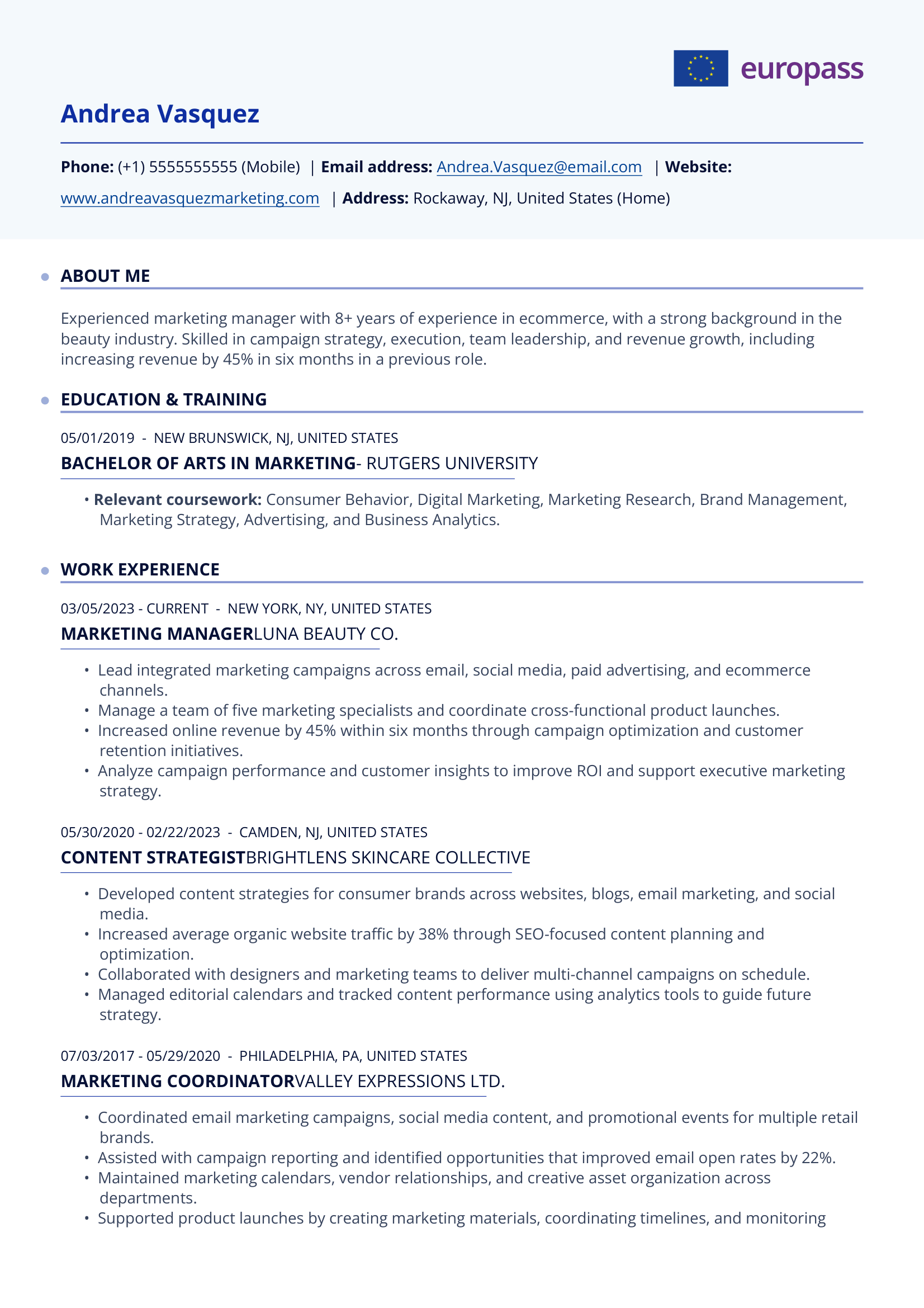
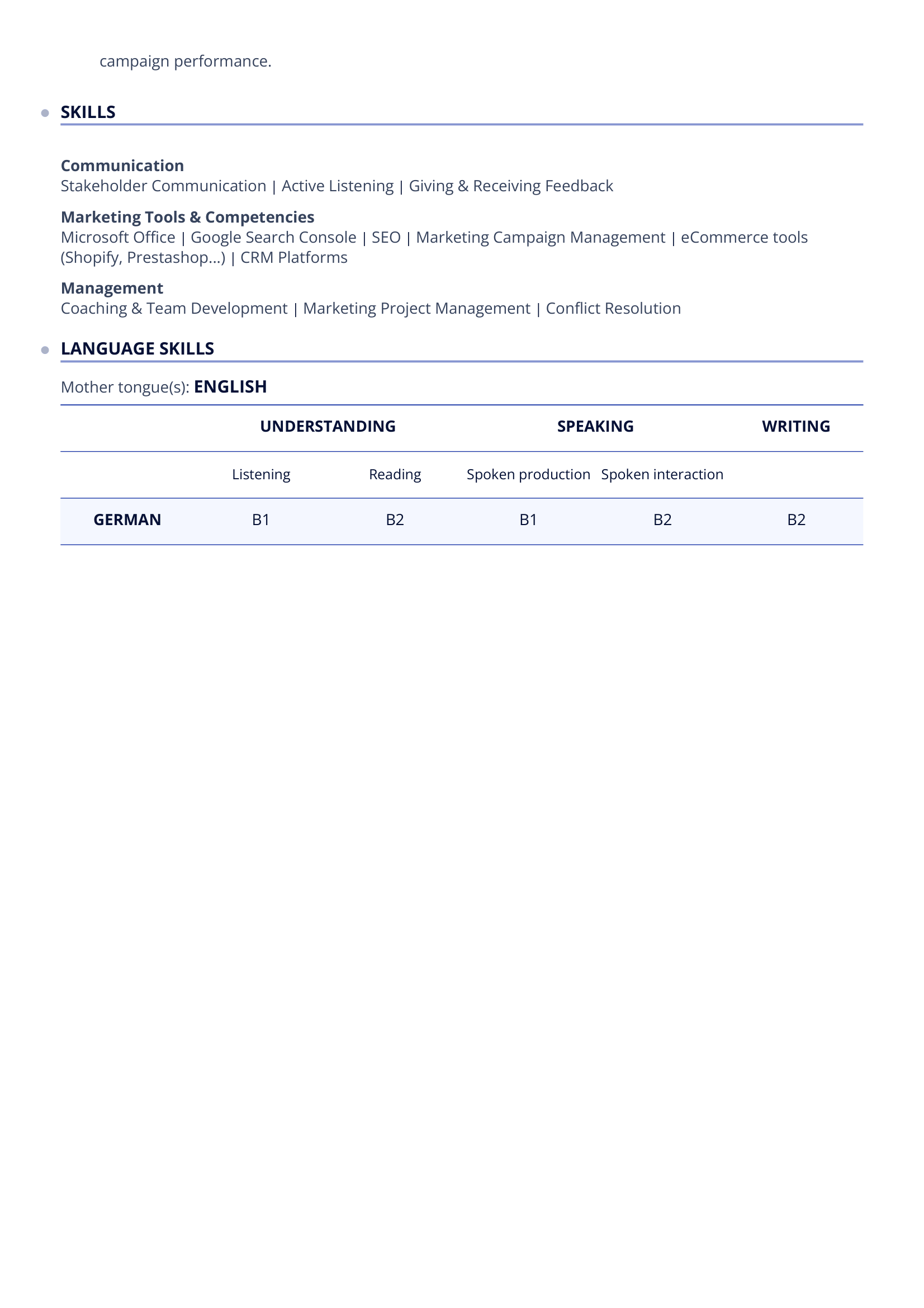
This example, built directly in the free Europass CV builder, demonstrates how to showcase an established career with multiple positions, measurable accomplishments, certifications, and technical skills.
It’s best suited for experienced professionals applying to EU institutions, government agencies, multinational employers, or senior-level positions.
More Europass-Style CV Examples
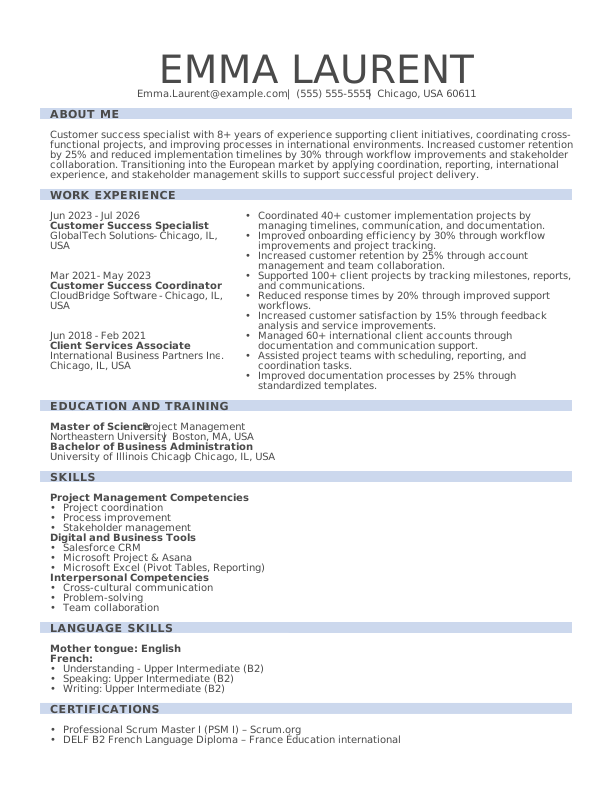
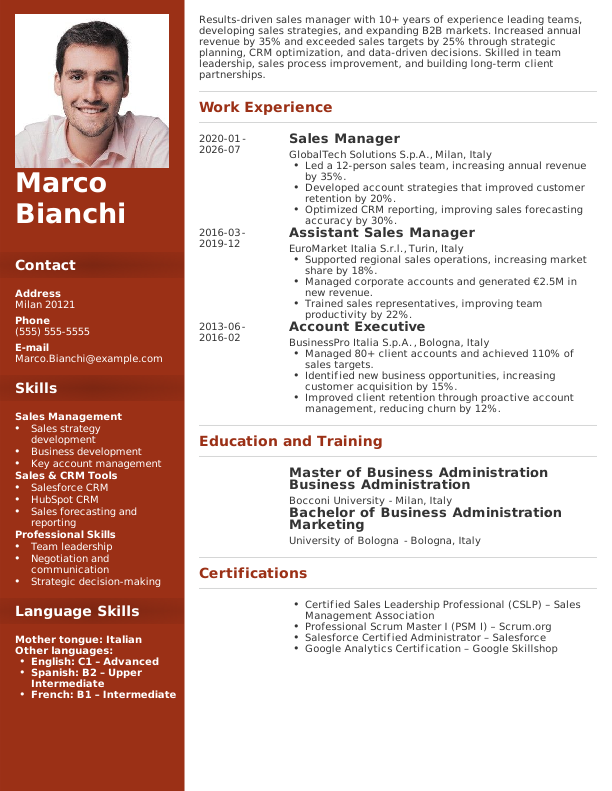
The following new graduate, career changer, and CV with a photo examples were created using Monster’s Resume Builder and adapted to reflect the Europass CV format, showing how you can achieve a similar standardized structure with customizable templates.
New Grad
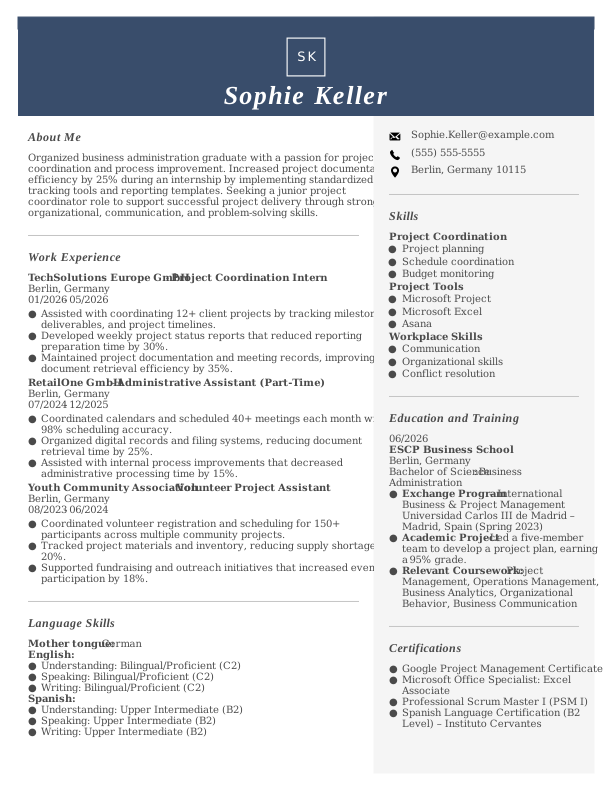
This example shows how recent graduates can emphasize education, internships, academic projects, volunteer experience, and transferable skills when they have limited professional experience.
It’s ideal for students, recent graduates, and entry-level job seekers applying for their first full-time role.
Career Changer
This example highlights transferable skills, relevant certifications, and accomplishments from previous roles to support a transition into a new field.
It’s best for professionals changing careers or applying across Europe, where a standardized CV helps employers compare qualifications.
Example With a Photo
This example illustrates how a professional headshot can be incorporated into a Europass-style CV for countries or industries where photos are commonly expected.
How to Create a Europass CV Step by Step
To create a Europass CV, go to the Europass website, create a free profile, enter your work history, education, skills, and language levels, then generate and download your CV. If you already have your information ready, the process usually takes about 15 to 30 minutes.
Follow these steps to create your first Europass CV:
- Step 1:
Create a Free Europass Profile
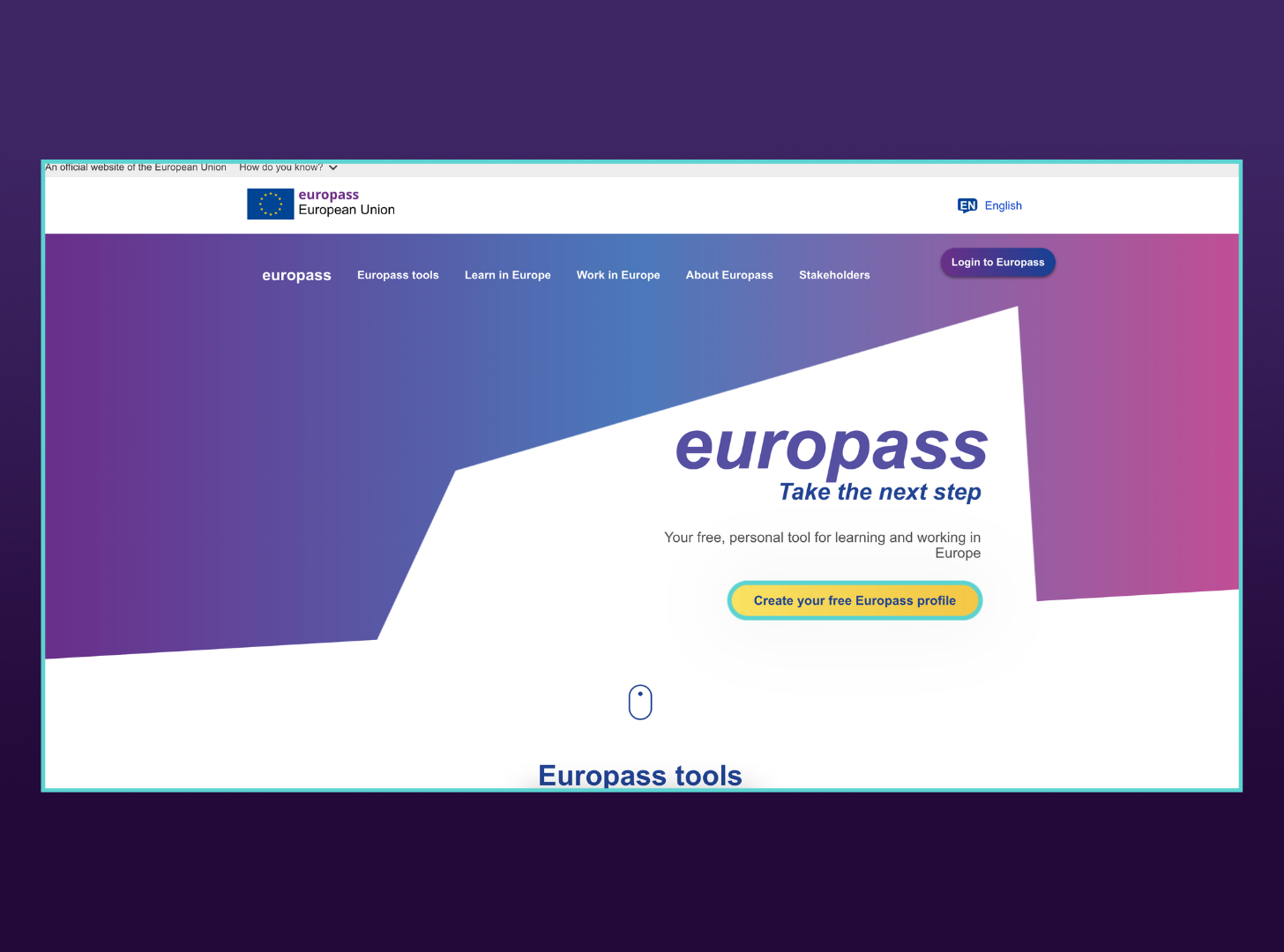
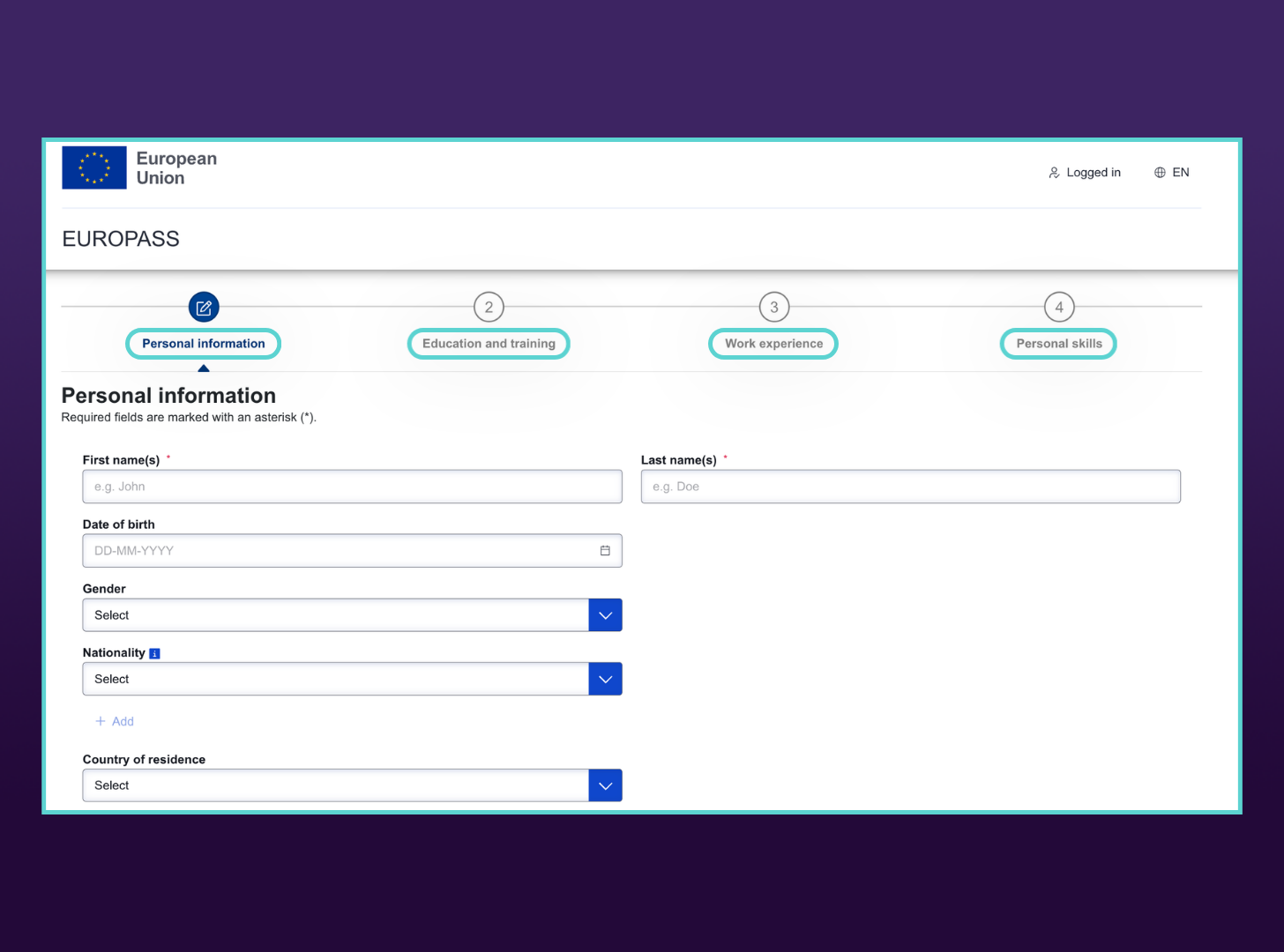
Go to the Europass website and select “Create your free Europass profile.” You can create a CV without registering, but a free account lets you save your information, update it later, and create multiple CV versions without starting over.
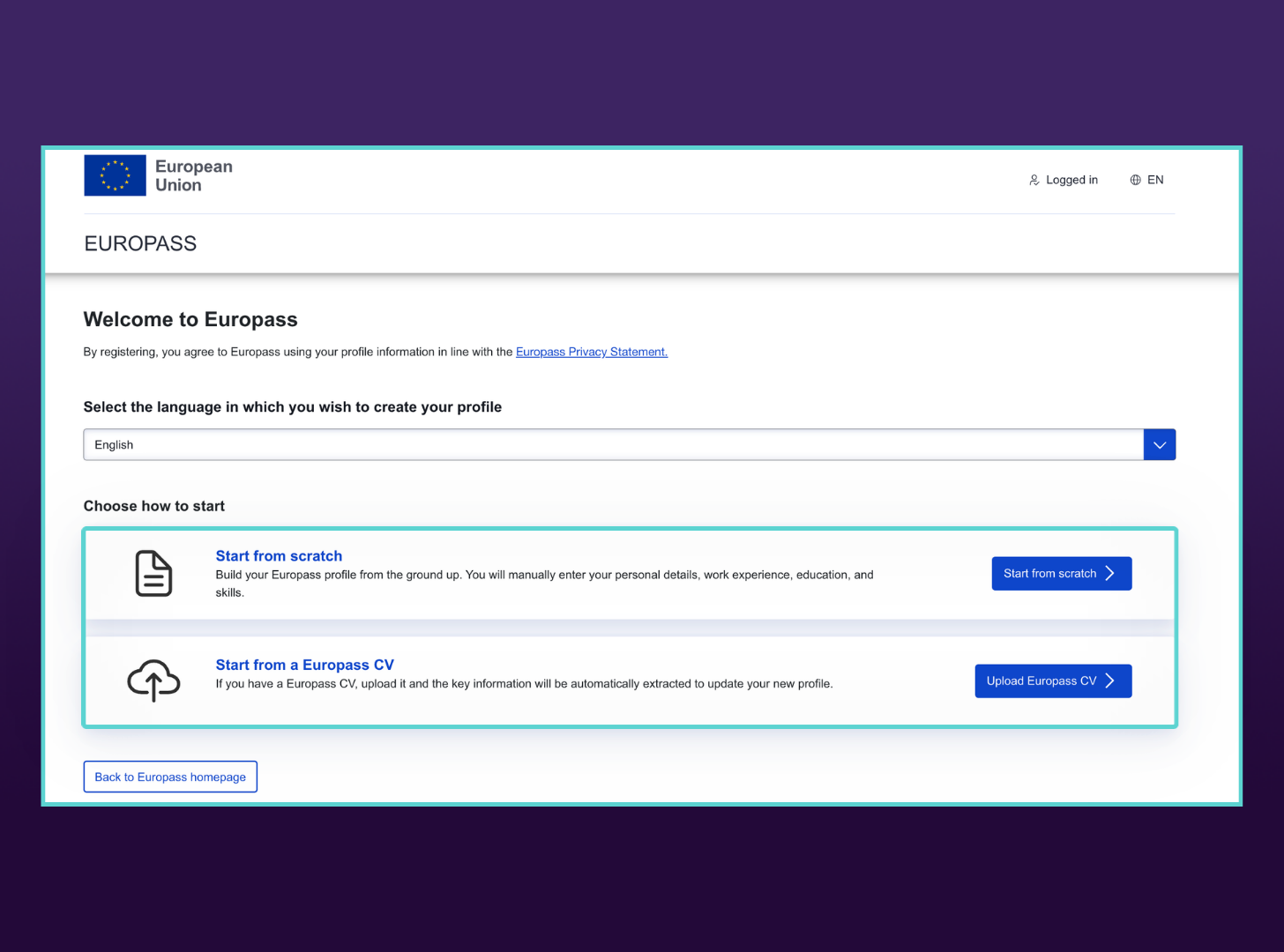
After selecting the profile option, choose how you want to begin. Select “Start from scratch” to enter your information manually, or upload an existing Europass CV to transfer its details into your new profile.
If you’re starting from scratch, complete each section of the profile, including your personal information, education and training, work experience, and personal skills. Required fields are marked with an asterisk, and you can save additional details as you move through each section.
- Step 2:
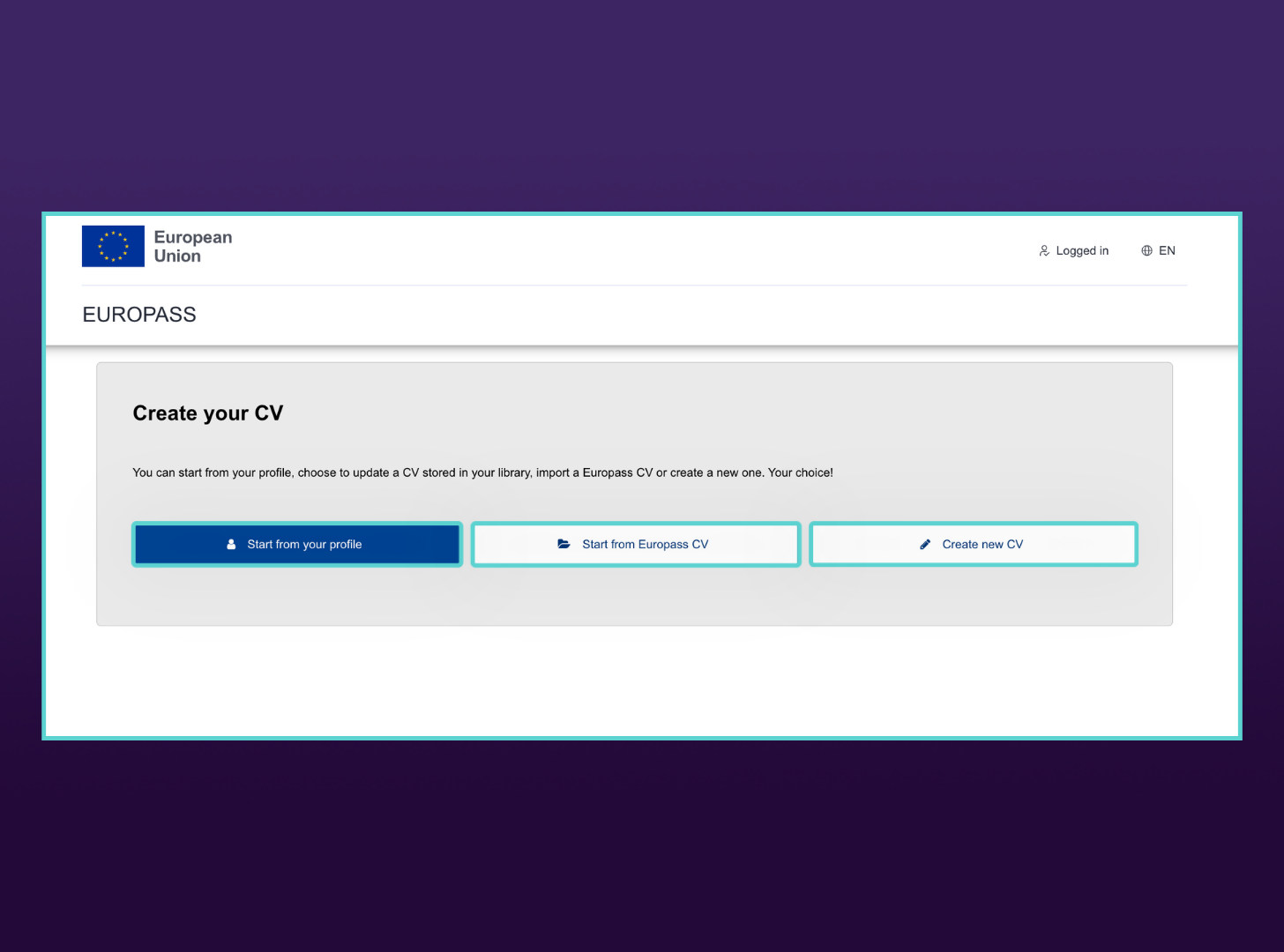
Build a CV From Scratch, From Your Profile, or From an Existing CV
Select whether you want to start from your Europass profile, update a CV saved in your library, import an existing Europass CV, or create a new CV. To build one from scratch, select “Create new CV.”
- Step 3:
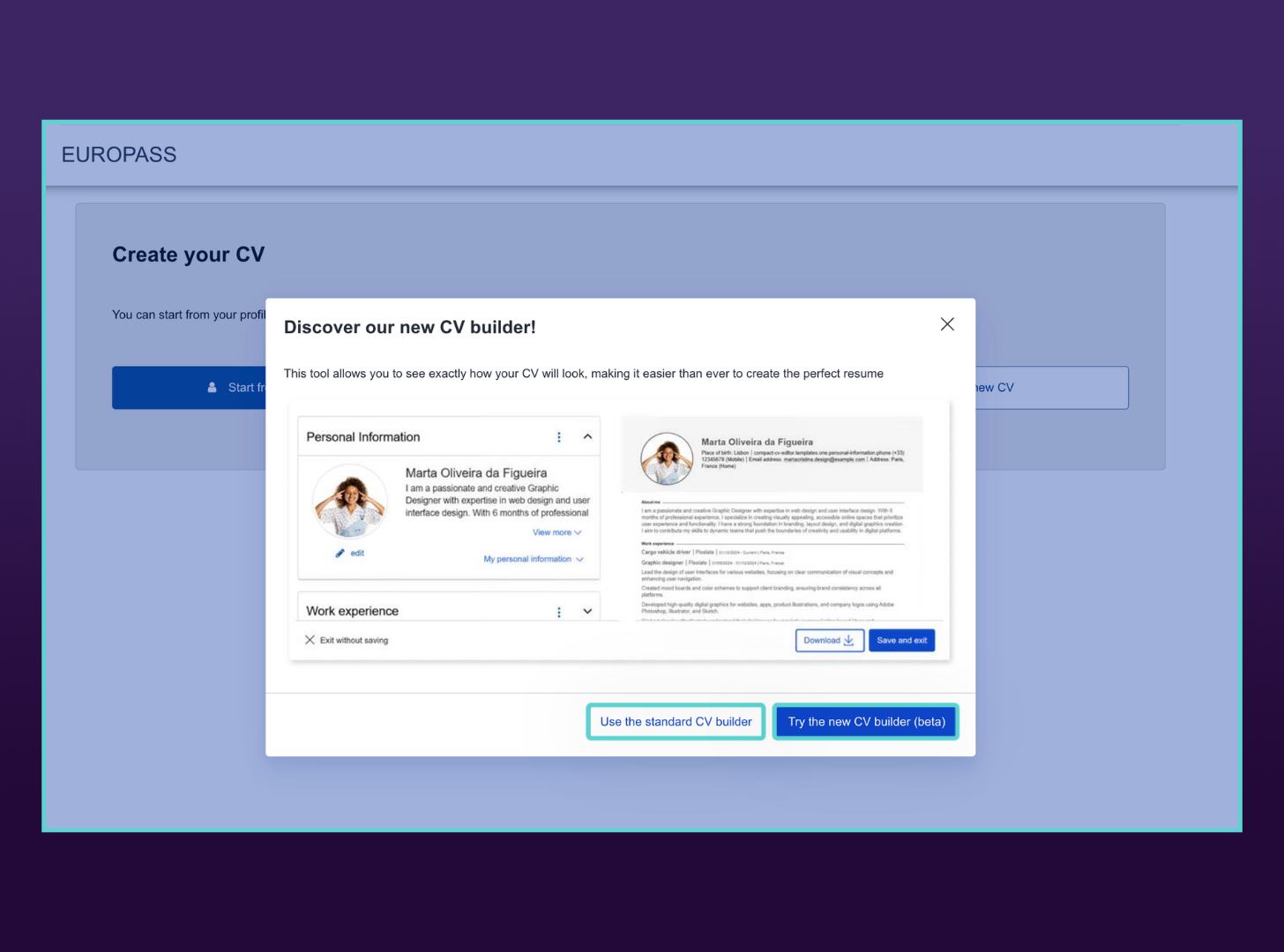
Start a New CV
After selecting “Create new CV,” Europass may prompt you to choose between the standard CV builder and the new beta builder. Select your preferred version (we will be using the new beta builder for this guide), then continue to create your CV using information from your saved profile or by entering your details manually.
- Step 4:
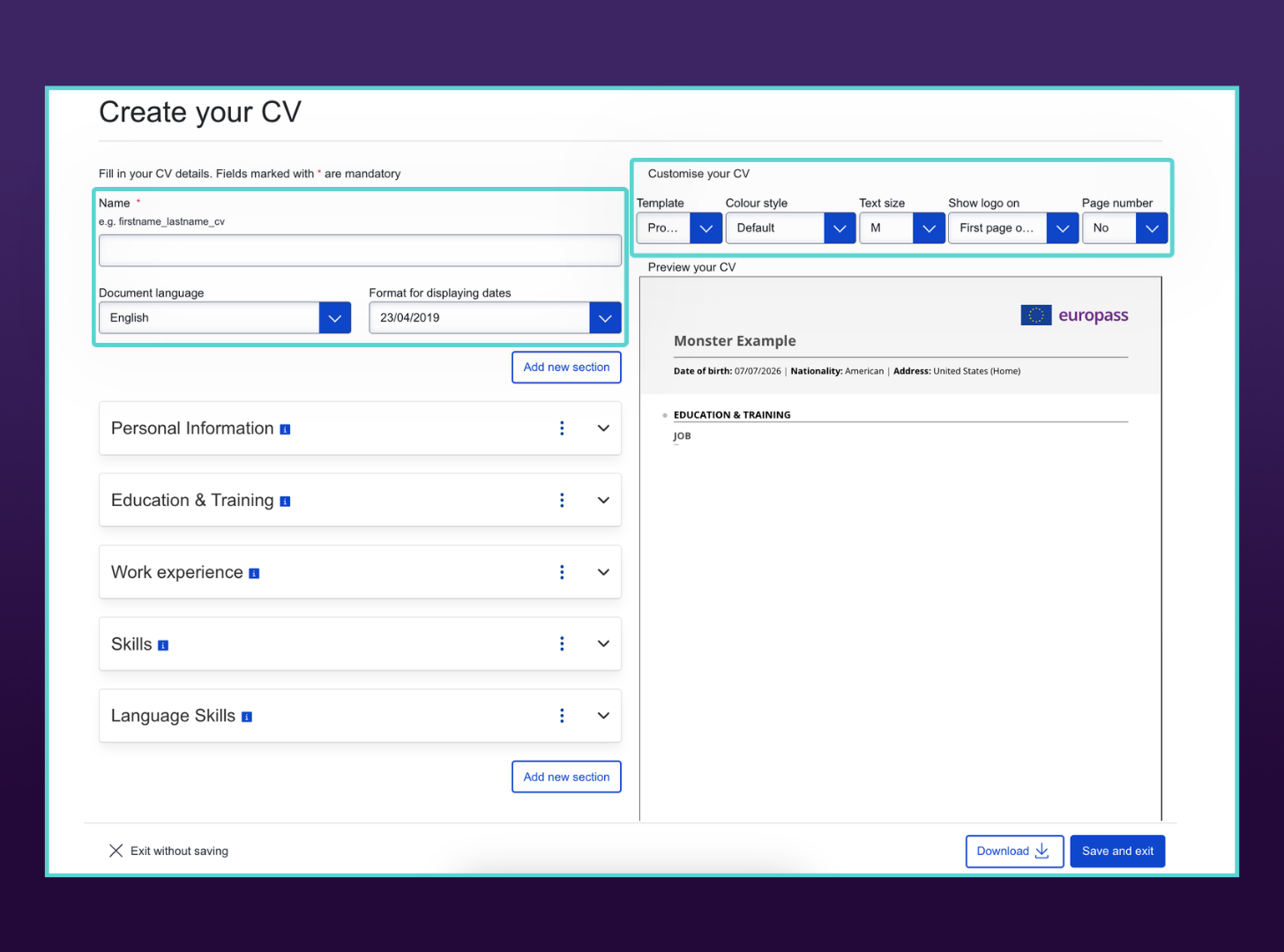
Name & Format Your CV
Name your CV so it’s easy to identify later, especially if you plan to create multiple versions. Then, choose your preferred date format, template, color scheme, text size, and other available design options. Europass offers limited customization, but these settings help you adjust the final look.
- Step 5:
Complete Your CV Content
Review or enter your personal information, including your name, contact details, location, and optional fields. Be selective with details like nationality, date of birth, gender, and photo. Include them only if the employer requests them or they’re appropriate for the country where you’re applying.
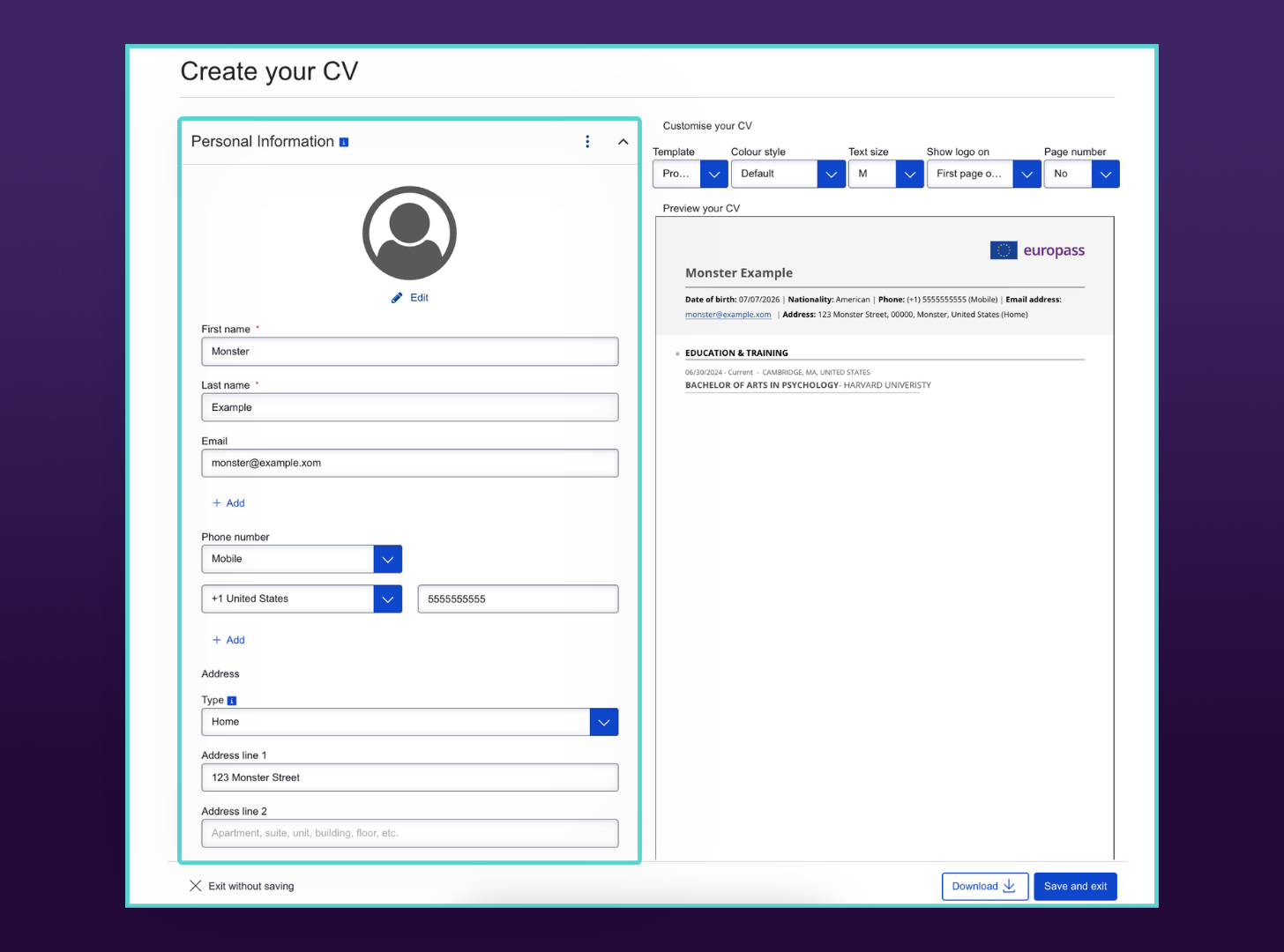
Add the “About Me” field and write a two- to three-sentence professional summary or resume objective. Use this space to quickly explain your background, strongest qualifications, and target role.
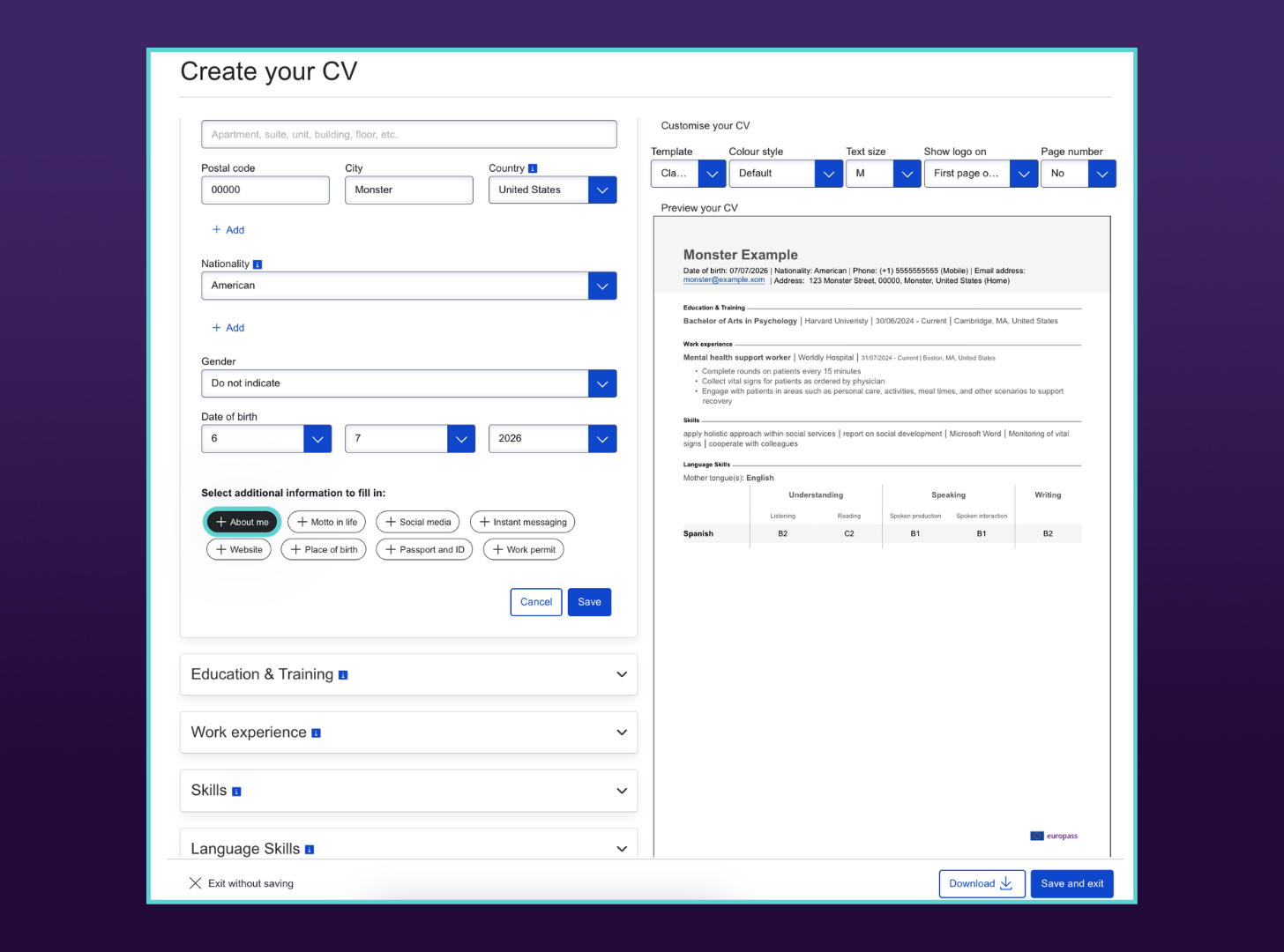
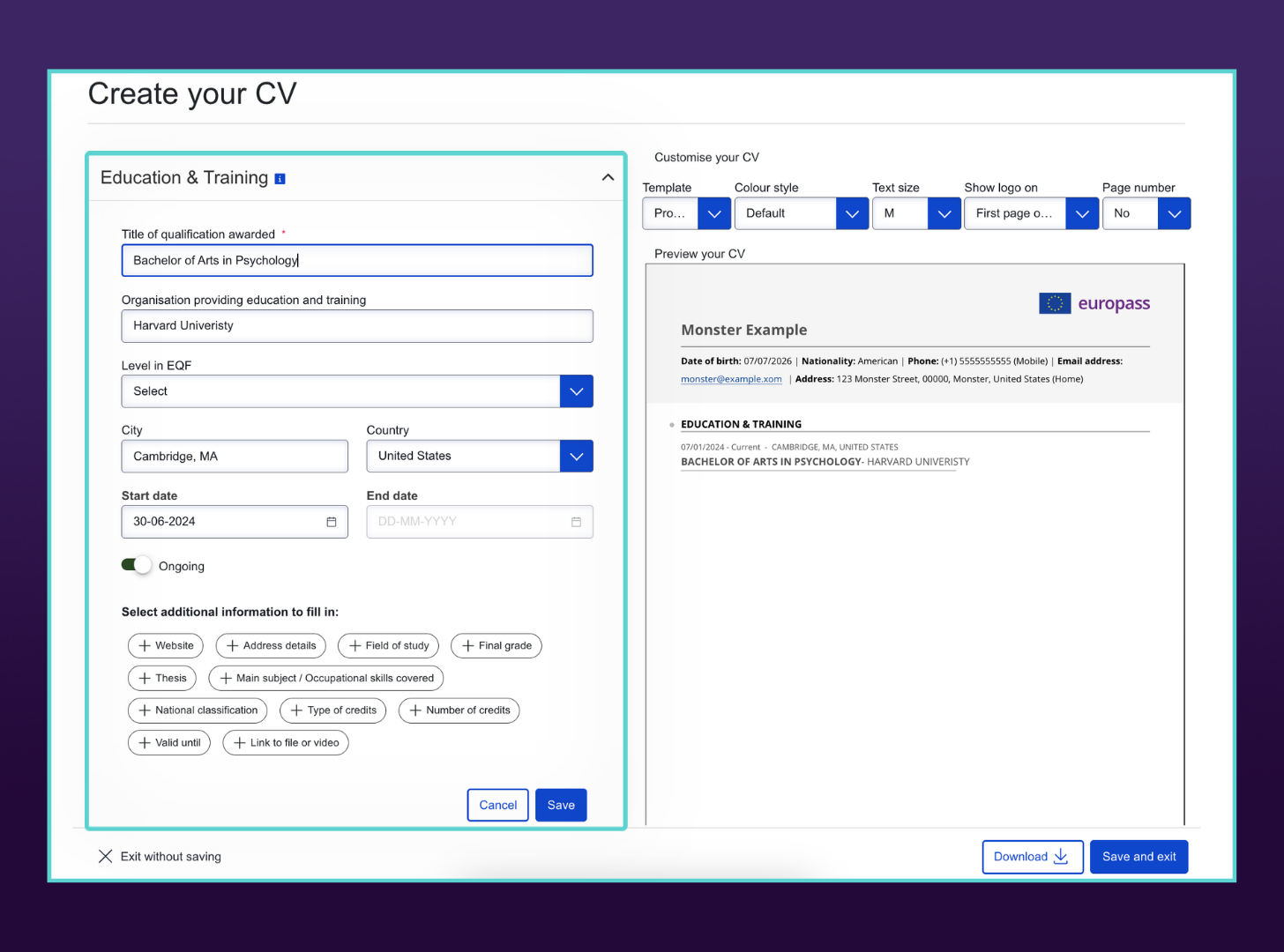
Next, review your education, training, work experience, and skills.
For your education entries, add each degree, diploma, certification, or training program, along with the institution, location, and dates attended.
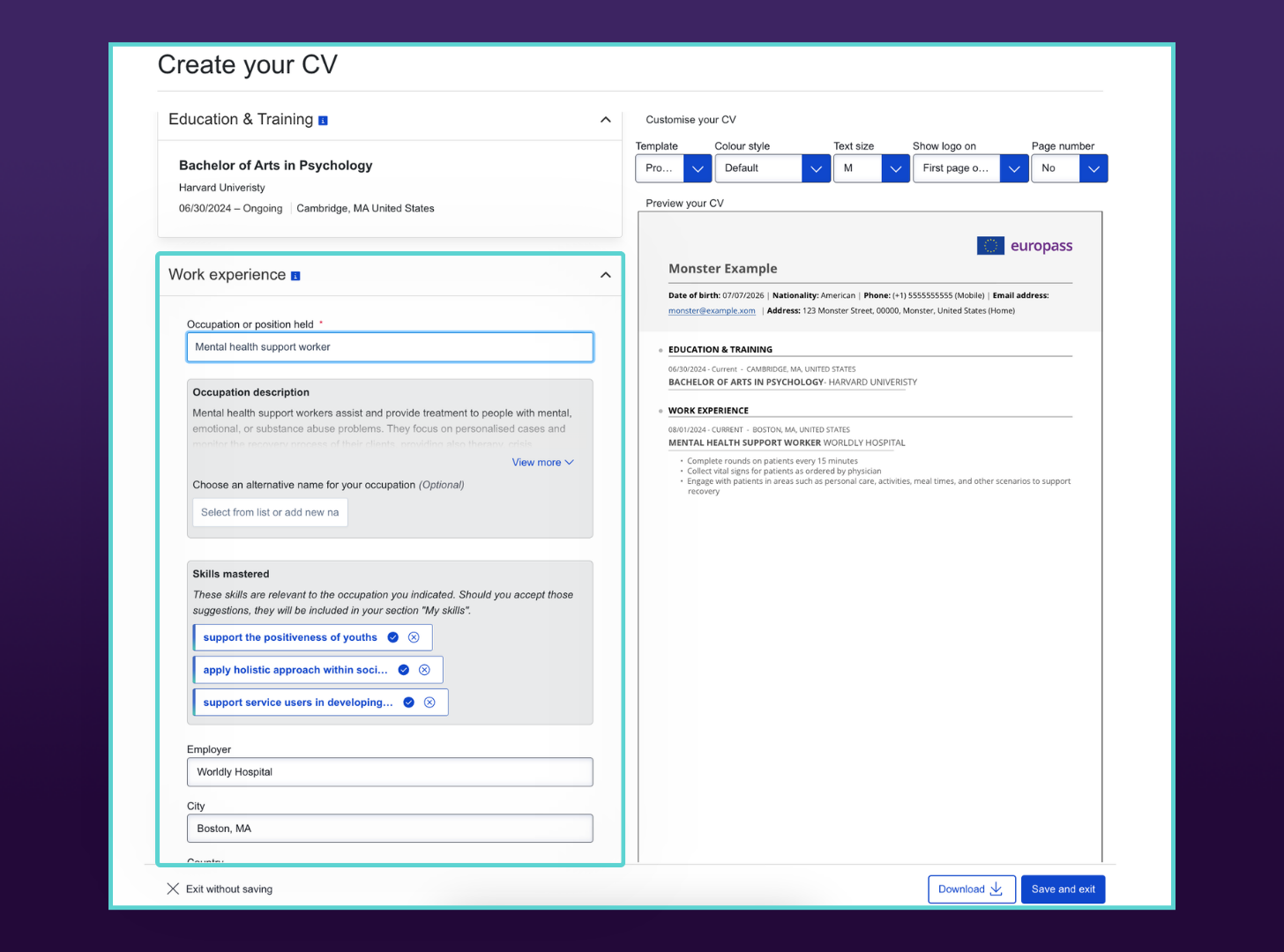
Focus your work experience on responsibilities, skills, and results most relevant to the role. Remember to replace generic duties with clear, measurable accomplishments whenever possible.
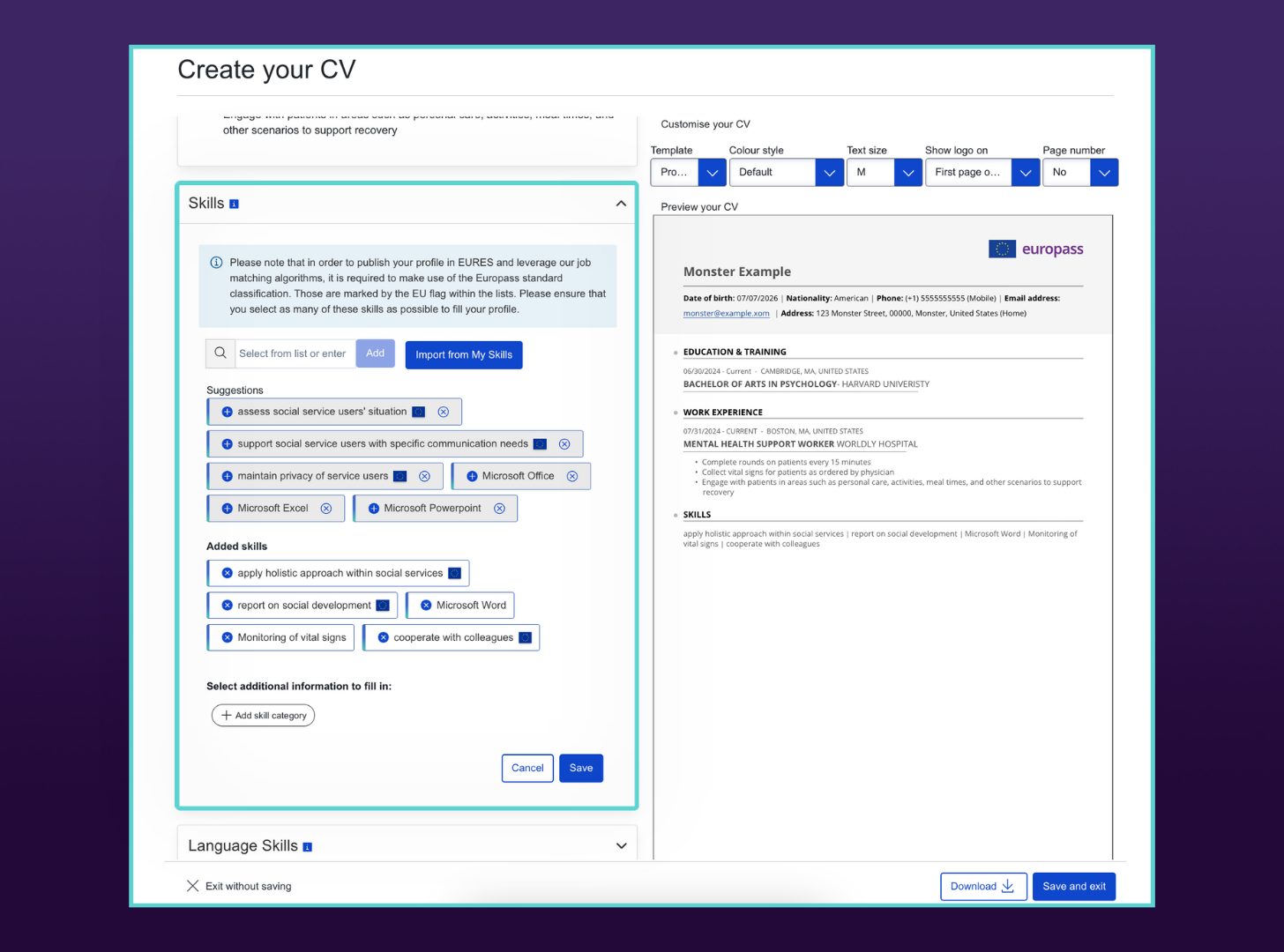
In the skills section, you can display your competencies individually or organize them into categories, depending on what makes your qualifications easiest to scan.
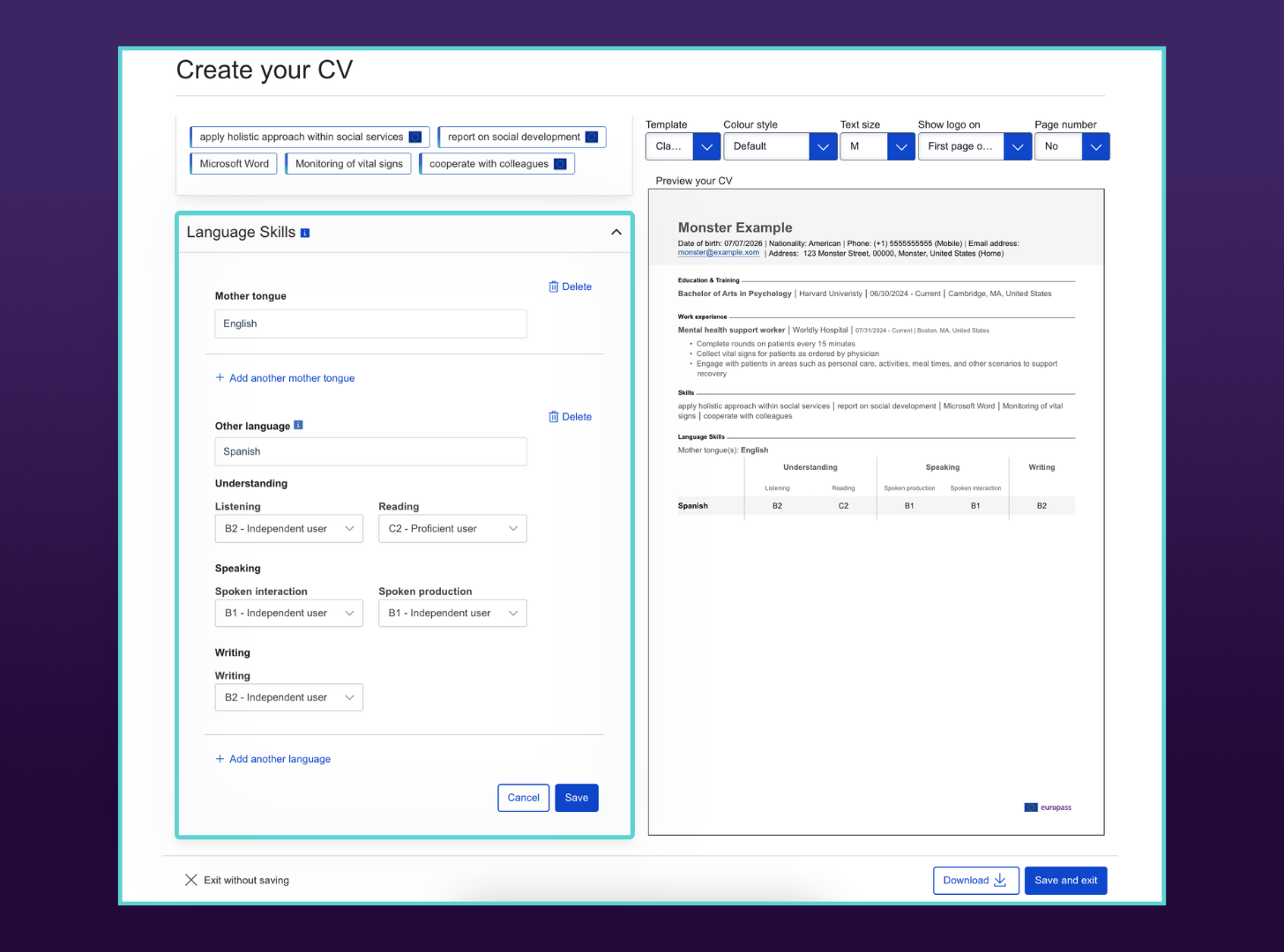
Then, complete your language skills using the CEFR scale. Rate each language separately for listening, reading, spoken interaction, spoken production, and writing. Use accurate levels instead of estimating one general proficiency rating.
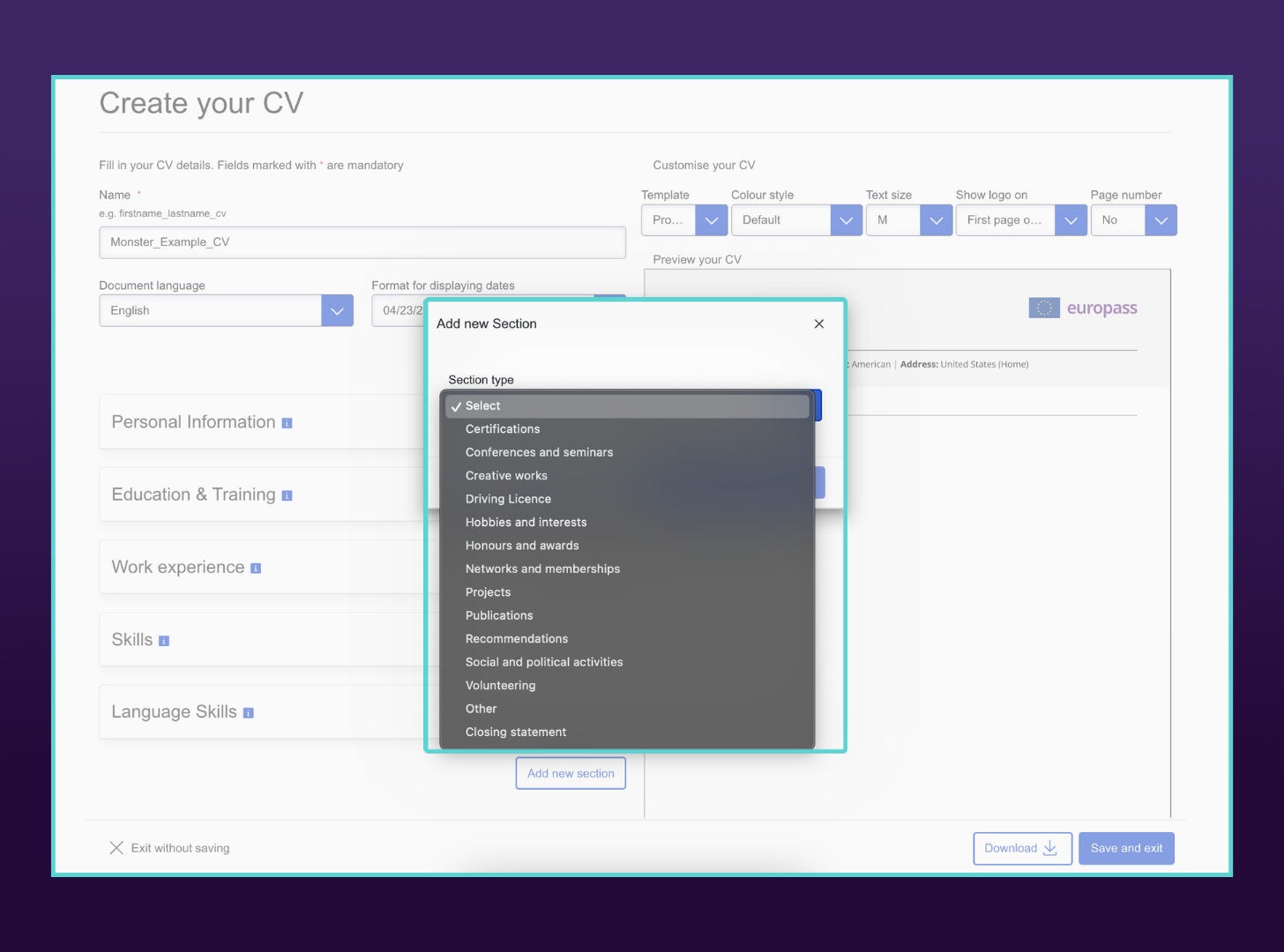
Finally, add additional sections as needed, such as certifications, volunteer work, projects, publications, professional memberships, awards, or licenses. These sections can strengthen your CV, especially for academic, research, public-sector, or international applications.
- Step 6:
Review & Download Your CV
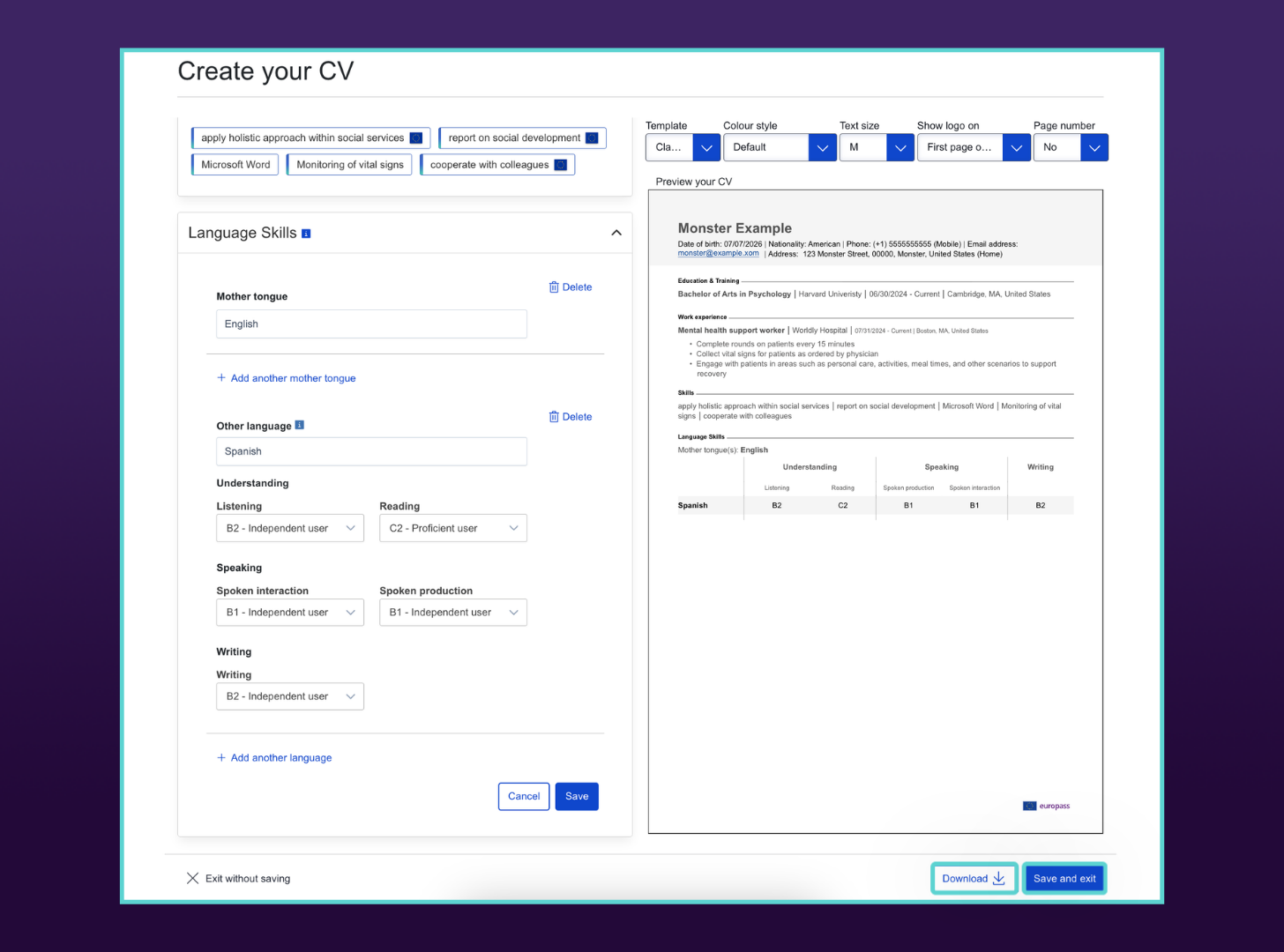
Review the full document for accuracy, formatting, spelling, dates, and relevance. When you’re finished, download your CV as a PDF to preserve formatting. You can also choose “Save and exit” if you want to return to it later.
When to Use a Europass CV (& When Not To)
Use a Europass CV when an employer asks for it, you’re applying across Europe, or you need a standardized format for academic, public sector, or international applications. Skip it when a tailored resume would help you stand out, especially for private-sector, creative, competitive, or UK-based roles.
Here’s when the Europass format makes sense and when another CV format is likely the better choice:

When to Use a Europass CV
The employer or job posting requests a Europass CV. If the application specifically asks for a Europass CV, use it. Submitting another format may suggest you didn’t follow the instructions.
You’re applying to an EU institution or government agency. Many European public sector employers, EU institutions, universities, and publicly funded organizations are familiar with the Europass format and may prefer or require it.
You’re applying for jobs across multiple European countries. If you’re submitting applications in several countries and aren’t familiar with each country’s resume conventions, the standardized Europass format provides a widely recognized alternative.
You’re applying for academic or research positions. Universities, research institutions, and international education programs frequently accept or encourage Europass CVs because they clearly present education, qualifications, publications, and language skills.
You need a free, professional CV quickly. The Europass builder automatically formats your information, making it a convenient option if you don’t have time to design a CV from scratch.

When to Skip a Europass CV
You’re applying for creative or highly competitive private-sector roles. Fields such as marketing, design, media, advertising, and technology favor tailored resumes that better showcase your experience and personal brand.
You’re applying for jobs in the United Kingdom. Most UK employers prefer traditional, UK-style CVs. Europass is relatively uncommon there and may come across as generic unless the employer specifically requests it.
You need to keep your resume to one page. Because of its standardized sections and formatting, a Europass CV often extends to two pages or more, even for candidates with relatively little experience.
You want complete control over your layout. The Europass format offers limited customization. If you want to adjust spacing, section order, typography, or visual design, creating your own resume provides much greater flexibility.
The employer doesn’t mention Europass, and you want to stand out. A well-designed, tailored resume makes a stronger first impression than a standardized template. Unless Europass is requested or commonly used in your target field, a customized resume is a better choice.
Europass CV Writing Tips
To write a strong Europass CV, focus on accuracy, relevance, and measurable proof of your qualifications. The format is standardized, so your content needs to do the heavy lifting. Use quantified achievements, accurate CEFR language levels, tailored sections, and country-appropriate personal details to make your CV stronger.

Quantify Your Achievements
Whenever possible, show the impact of your work with numbers instead of general statements. Metrics help employers quickly understand your contributions and make your experience more credible. Include percentages, revenue, cost savings, project sizes, team sizes, or other measurable results wherever you can.
For example, instead of writing “Managed social media accounts,” write “Managed social media campaigns across five platforms, increasing engagement by 45% in 12 months.”

Tailor Your CV to Each Application
Avoid sending the same Europass CV to every employer. If you’ve created your CV through the Europass platform, you can easily include or exclude sections from your profile to match each opportunity. Review the job description carefully and incorporate relevant keywords, skills, and qualifications so your CV reflects what the employer is looking for.

Be Strategic About Personal Details
The Europass template includes optional fields for your nationality, date of birth, gender, and photo. Unless an employer specifically requests this information or it’s customary in the country where you’re applying, you can leave these fields blank.
If you’re authorized to work in the destination country, consider mentioning your work permit or visa status in the About Me section instead. If you’re unsure whether to include a photo, research local hiring norms before submitting your application.

Fill Out the Language Section Accurately
Language skills are one of the defining features of a Europass CV. Use the CEFR scale honestly and evaluate each skill separately, including listening, reading, spoken interaction, spoken production, and writing.
Be honest and don’t overstate your proficiency. Employers familiar with the Europass format expect these ratings to accurately reflect your abilities, and if you can’t perform in practice, it’ll reflect poorly on your credibility.

Add Relevant Supporting Sections
Take advantage of the Additional Information section to showcase qualifications that don’t fit elsewhere. Career certifications, volunteer work, research, publications, professional memberships, projects, and digital skills can all strengthen your application.
And while Europass CVs are often slightly longer than traditional resumes and CVs, every section should support your qualifications for the role—no need to provide every detail of your academic and professional career.

Proofread Before You Download
Even though the Europass builder formats your CV automatically, mistakes can still happen. Information may carry over from your profile that isn’t relevant to a particular application, or formatting and spacing may shift after sections are added or removed.
Before performing your final Europass CV download, review the entire document carefully for accuracy, consistency, grammar, and completeness.
Countries That Accept Europass CVs
The Europass CV is used and supported across the European Union, the European Economic Area (EEA), and several EU candidate countries and neighboring European countries. Private employers may still prefer a local CV or resume format, so always follow the job posting first.
You’re most likely to see Europass CVs used, requested, or accepted in the following countries:
- Austria
- Belgium
- Bosnia and Herzegovina
- Bulgaria
- Croatia
- Cyprus
- Czech Republic
- Denmark
- Estonia
- Finland
- France
- Georgia
- Germany
- Greece
- Hungary
- Iceland
- Ireland
- Italy
- Kosovo
- Latvia
- Liechtenstein
- Lithuania
- Luxembourg
- Malta
- Moldova
- Montenegro
- Netherlands
- North Macedonia
- Norway
- Poland
- Portugal
- Romania
- Serbia
- Slovakia
- Slovenia
- Spain
- Sweden
- Turkey
- Ukraine
A CV for Wherever You Want to Work
If you’re applying to jobs throughout Europe, it’s a good idea to have a strong Europass CV ready. Whether you build it directly through the Europass site or adapt a traditional CV into a Europass-style format, setting it up correctly shows employers you’ve done your research and allows you to present your qualifications in a clear, professional, and widely recognized way.
Frequently Asked Questions
Is the Europass CV free?
Yes. The Europass CV builder is completely free to use. You can create a Europass profile, generate multiple CVs, save your information, and download your documents without paying or creating a premium account.
What format can I download a Europass CV in?
You can download your Europass CV as a PDF, which is generally the best option for job applications because it preserves the formatting across devices.
Can I remove the Europass logo?
No. The Europass logo is built into the official templates and can’t be removed when you generate your CV through the Europass platform.
How long should a Europass CV be?
A Europass CV is typically one to two pages, although experienced professionals, researchers, and academics may need three to four pages to include relevant qualifications, publications, or projects. Include only information that’s relevant to the position.
Should I include a photo on my Europass CV?
It depends on where you’re applying. For example, photos are commonly expected in countries such as Germany and France, but are generally discouraged in the Netherlands. If the employer doesn’t specify, research local hiring norms before including one.
Is the Europass CV ATS-friendly?
Generally, yes. The Europass CV uses a standardized, structured layout that most applicant tracking systems (ATS) can read, particularly those used by European employers. A tailored resume, however, may provide more flexibility for keyword optimization and formatting.
Can I use a Europass CV in the UK?
You can, but it’s generally not recommended unless the employer specifically requests it. Most UK employers expect a traditional UK-style CV and may view the Europass format as unnecessarily generic or unfamiliar.

Kirsten Chorpenning is a career advice writer who empowers job seekers to take control of their career paths using Monster’s comprehensive job search and resume tools. She specializes in helping job seekers find rewarding jobs in today’s dynamic work environment.
See More From Kirsten ChorpenningExplore Related Career Advice

Nearly 3 in 10 LinkedIn Users Have Updated a Past Job After Leaving It

Updated:
Oct 7, 2026
|
7 min read

Employee Loyalty Statistics: 90% Say Companies Expect More Than They Give
Updated:
Oct 5, 2026
|
7 min read


Overqualified Hiring Stats: 57% Would Cut Resume Experience to Get Hired
Updated:
Sep 28, 2026
|
9 min read

20 First Job Interview Questions & Sample Answers: Tips to Land Your First Job
Updated:
Sep 24, 2026
|
20 min read

“Do You Have Any Questions for Me?” How to Answer in an Interview (30 Examples)
Updated:
Sep 18, 2026
|
14 min read



20 Companies That Pay 100% Health Insurance & Other Top Benefits
Updated:
Sep 10, 2026
|
14 min read
Manage Your Career Like an Expert
Take control of your professional journey with Monster’s expert resources. Explore advice, research, and tips to make informed decisions and advance your career with confidence.

Job Search
Discover strategies to get noticed, network effectively, and streamline your job search process.

Resumes
Get practical tips to create a resume or CV that stands out to employers and wins interviews.

Cover Letters
Learn how to craft a compelling cover letter that highlights your experience and fit for the role.

Career Paths
Explore career paths, industry trends, and growth opportunities to plan your next move.

Interviewing
Prepare for interviews with tips on answering common questions and following up effectively.

Career Development
Develop key skills and knowledge to grow in your current role or pivot to new opportunities.

Leaving a Job
Navigate job changes and career transitions with practical advice and planning resources.