

Free Instructional Designer Resume Templates & Examples
Elevate your chances of landing interviews with our expertly crafted instructional designer resume templates. These free resume templates include valuable writing tips to help you create a standout resume or CV that showcases your qualifications to potential employers.
Real-World Resumes That Get Results
 Free
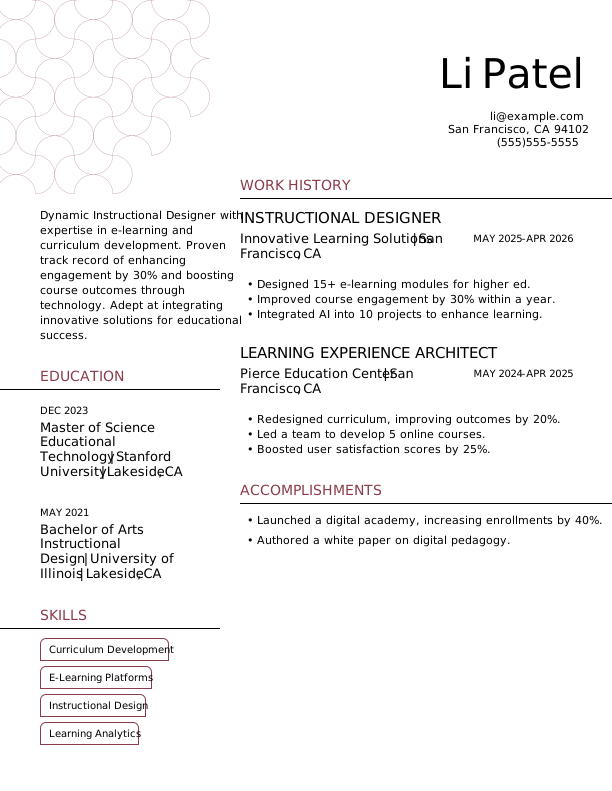
FreeInstructional Designer Entry-Level Resume
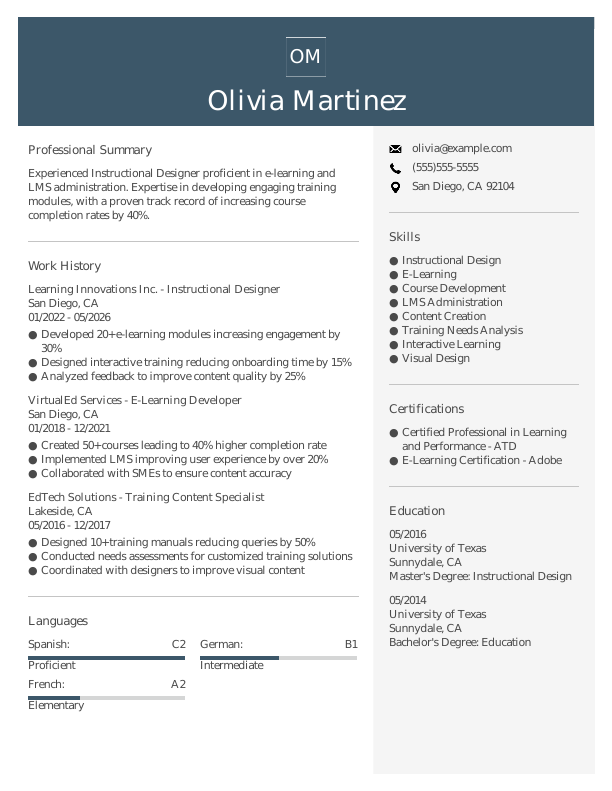
Instructional Designer Mid-Level Resume
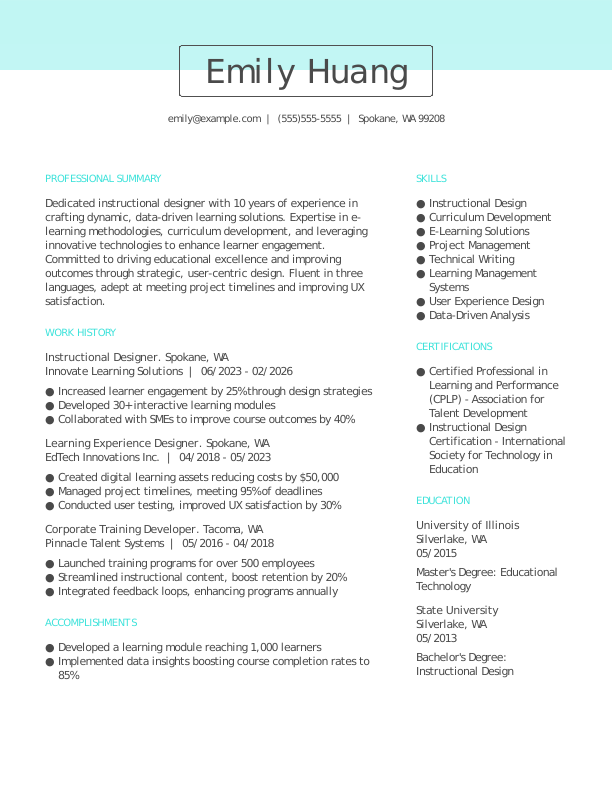
Instructional Designer Experienced Resume
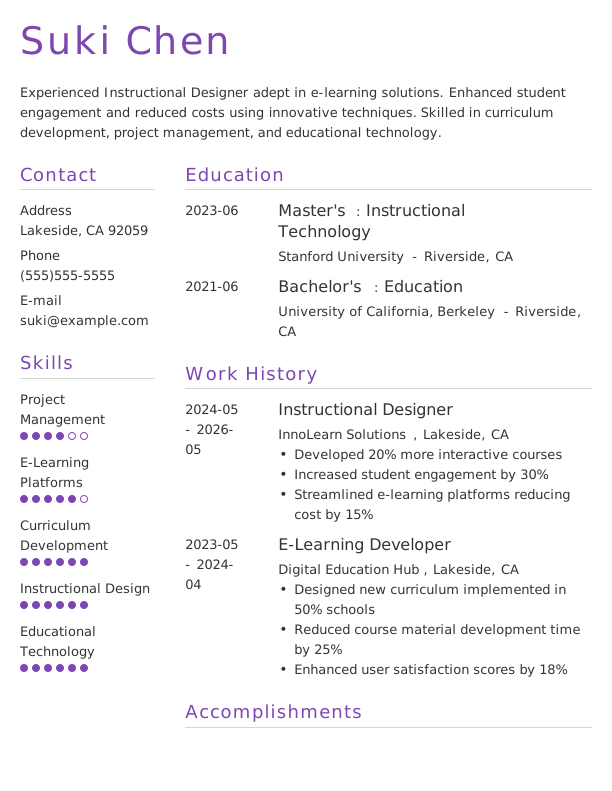
Instructional Designer Entry-Level Resume 1
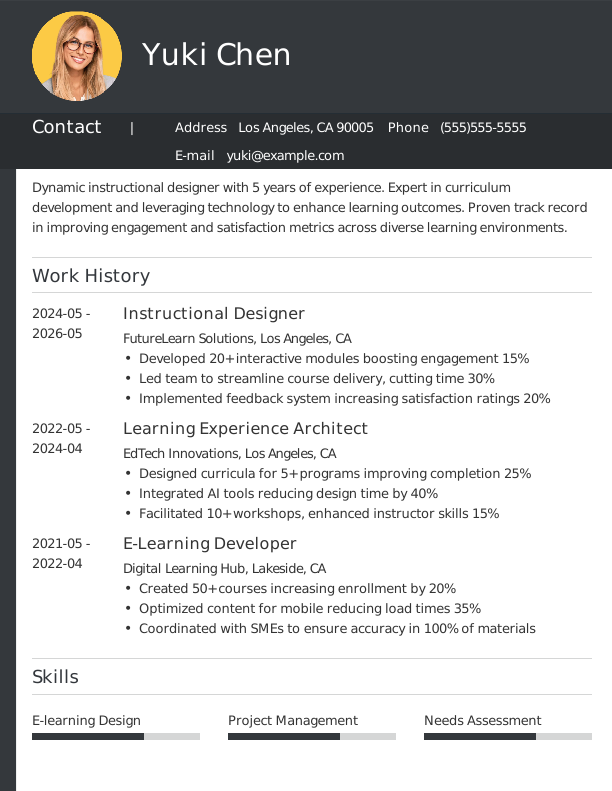
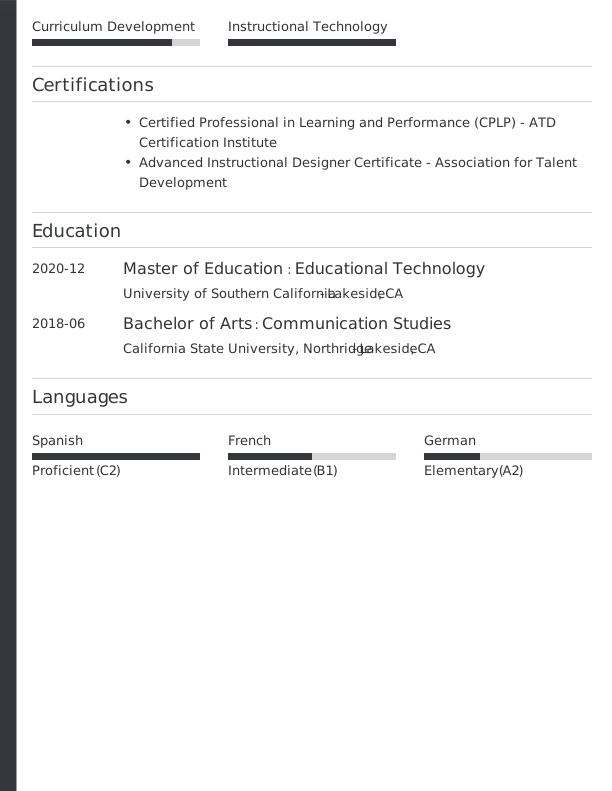
Instructional Designer Mid-Level Resume 1
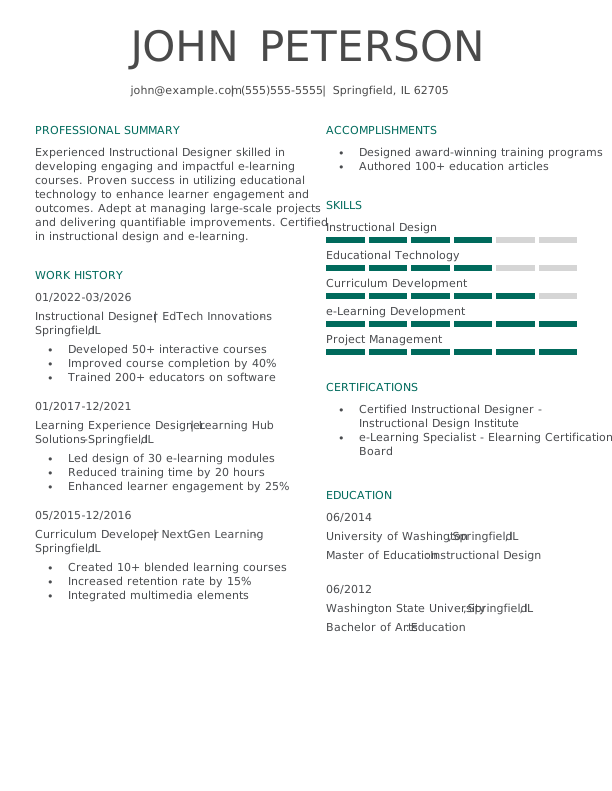
Instructional Designer Experienced Resume 1
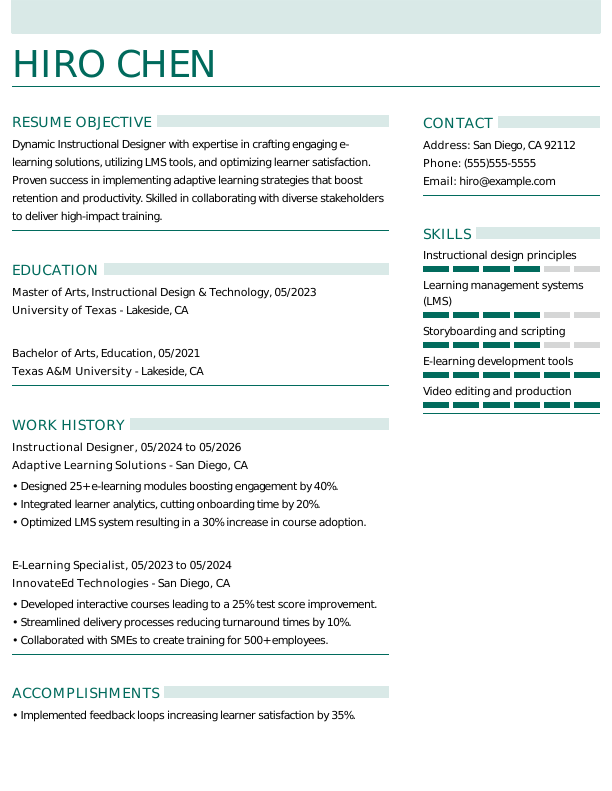

Instructional Designer Entry-Level Resume 2
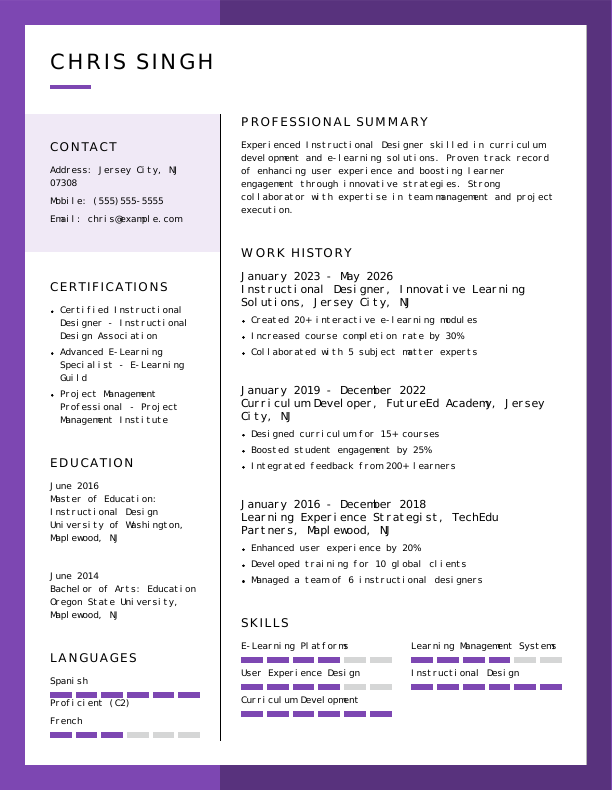

Instructional Designer Mid-Level Resume 2
Browse Free Resume Templates
- Accounts Payable
- Adjunct Professor
- Artist
- ATS-Friendly
- Auto Mechanic
- Baker
- Business Development Manager
- Business
- Certified Nursing Assistant
- Classic & Traditional
- Cleaner
- College Student
- Concierge
- Construction Worker
- Corporate
- Creative & Unique
- Custodian
- Customer Service
- Dental Assistant
- Direct Support Professional
- Entry-Level
- Flight Attendant
- Hospitality & Food Service
- Front Desk Receptionist
- Healthcare
- High School
- Housekeeping
- Hvac Technician
- Inventory Manager
- Logistics
- Maintenance
- Management
- Modern
- Mortgage Loan Processor
- Pet Sitter
- Phlebotomist
- Production
- RBT
- Restaurant Server
- Sales
- Security Services
- Simple & Basic
- Social Work
- Teacher
- Technology
Resume Examples for Instructional Designers
Resumes and CVs for instructional designers should highlight the different levels of experience, from entry-level positions to seasoned professionals. Discover our tailored templates for each stage and take advantage of our Resume Builder to craft your ideal document.
Entry-Level Instructional Designer Resume
Ideal for recent graduates and career changers stepping into instructional design, this template supports those crafting a resume with no experience while showcasing their potential in the field.

Mid-Career Instructional Designer Resume
A smart choice for instructional designers looking to elevate their careers, this template effectively showcases experience and recent achievements to support advancement into specialized roles.

Experienced Instructional Designer Resume
An ideal choice for seasoned instructional designers with over 10 years of experience, this template supports professionals aiming for advanced roles in educational technology and innovative learning solutions.

Instructional Designer Resume Template (Text)
Use this customizable text format of an instructional designer resume to copy, modify, and tailor directly in your document.
Olivia Smith
Riverside, CA 92515
Professional Summary
Experienced Instructional Designer with a proven ability to create engaging eLearning solutions, streamline training processes, and leverage technology for impactful learning experiences. Expertise in needs assessment, LMS systems, and multimedia integration. Passionate about delivering measurable results and fostering learner success.
Work Experience
May 2023 – May 2026
Pinnacle Learning Solutions – Riverside, CA
Instructional Designer
- Designed 30+ eLearning modules, boosting engagement by 25%
- Analyzed learning needs for 5 departments to optimize training
- Implemented multimedia tools, improving retention by 15%
May 2020 – April 2023
Vertex Skills Consulting – Riverside, CA
Corporate Training Specialist
- Delivered training solutions, reducing onboarding time by 20%
- Developed 7 training programs, increasing compliance rates by 10%
- Collaborated with SMEs, achieving 95% learner satisfaction
May 2017 – April 2020
Summit Knowledge Hub – Riverside, CA
Learning and Development Coordinator
- Facilitated workshops attended by 500+ employees yearly
- Created 12 instructional videos, driving user completion rates
- Led LMS implementation, achieving 99% system adoption
Education
May 2016
University of Texas at Austin Austin, TX
Master of Education (M.Ed.) Instructional Technology
May 2014
Texas State University San Marcos, TX
Bachelor of Arts (B.A.) Educational Psychology
Certifications
- Certified Instructional Designer (CID) – Association for Talent Development
- Advanced eLearning Specialist – International eLearning Association
Skills
- eLearning Development
- Instructional Design
- Storyboarding
- Learning Management Systems
- Multimedia Integration
- Needs Assessment
- Adult Learning Theory
- Content Authoring Tools
How to Write an Instructional Designer Resume
As an instructional designer, knowing how to write a resume means combining your creative skills and relevant experience with a format that clearly showcases your qualifications for the role. Use the guidance below to highlight your strengths and tailor your resume to fit the specific positions you’re aiming for.
1. Contact Info
Your contact information must be clear, professional, and prominently displayed at the top of your resume.
Include the following essential information:
- Full name
- Phone number
- Professional email address
- City and state (ZIP code is optional)
- LinkedIn profile or personal portfolio (if relevant)
 PRO TIP
Avoid listing personal details such as your age, gender, or social media profiles unless explicitly requested by the employer.
2. Resume Profile
A resume profile is a brief introductory section, typically consisting of two to four sentences, that highlights your key qualifications and skills. Its primary purpose is to serve as an engaging pitch to hiring managers, encouraging them to explore your resume further and consider you for the position.
This profile is strategically placed at the top of your resume and can be formatted as either a summary or an objective, each serving distinct functions. Choosing the right format can significantly influence how your qualifications are perceived:
- A resume summary highlights essential qualifications, design expertise, and achievements relevant to the learning development sector. This format benefits professionals with experience or transferable skills eager to illustrate their contributions as innovative instructional designers.
- A resume objective is a forward-looking statement that highlights your career aspirations and what you aim to achieve in your next role. It’s particularly beneficial for recent graduates or professionals shifting into new fields.
Let’s compare a resume summary and a resume objective to understand their distinct purposes:
Instructional designer resume summary example:
Innovative instructional designer with 6+ years of experience in diverse learning environments, including corporate training and higher education. Proficient in curriculum development, e-learning technologies, and learner engagement strategies. Recognized for creating powerful educational programs that improve knowledge retention and boost learner performance.
Instructional designer resume objective example:
Recent graduate with a master’s in instructional design eager to launch a career in an innovative educational setting. Committed to creating engaging learning experiences and looking to contribute strong analytical skills and adaptability to a dynamic e-learning organization.
3. Work Experience
The work experience on your resume is a critical foundation for showcasing your qualifications. Employers dive deep into your history to gauge not only your roles but also the contributions you’ve made along the way. This background illustrates how your skills and expertise as an instructional designer align perfectly with the demands of the position you seek.
The work experience section should contain:
- Job title
- Employer name and location
- Dates of employment (month/year)
- 3–5 bullet points detailing your design and development of engaging learning experiences
Tailor your work experience bullet points to reflect the job description. Start with strong action verbs relevant to instructional design, such as “Developed,” “Designed,” or “Facilitated,” to make your contributions stand out.
Incorporate quantifiable metrics wherever possible. Specific numbers, like increased learner engagement by 30% or reduced course development time by 20%, help showcase your impact and set you apart from other applicants.
In general, consider following the format of:
[action verb] + [responsibility] = [result/achievement]
For example:
Developed and implemented over 10 online courses for healthcare professionals, resulting in a 30% increase in course completion rates and improved learner engagement.
Note that you can also flip the result/achievement with the responsibility:
Achieved a 25% improvement in training effectiveness scores by leveraging data analytics to tailor instructional content.
Explore more work experience examples for instructional designers further down the page.
4. Skills
The skills section provides a brief overview of your professional abilities, emphasizing your expertise in instructional design. This ATS-friendly resume feature ensures hiring managers can quickly evaluate your qualifications and determine if you’re a good fit for the role.
Skills can be grouped into three main categories:
- Soft skills are interpersonal abilities that influence how well instructional designers collaborate with others. Critical soft skills for this role include communication, creativity, teamwork, and adaptability.
- Hard skills are specific, quantifiable abilities acquired through education, training, or experience. For an instructional designer, these include developing e-learning modules, conducting needs assessments, and using authoring tools like Articulate Storyline.
- Technical skills encompass the specific capabilities required to use various tools and technologies in a field. In instructional design, this includes expertise in learning management systems (LMS) and assessment software.
Generally, aim to include a well-rounded selection of skills that directly correspond with the job requirements to showcase your qualifications. For more examples of specific skills tailored for instructional designers, please refer to the skill suggestions listed further down the page.
PRO TIP
If you’re a newer instructional designer, consider placing your skills section higher on your resume right after your summary. For those with more experience, it’s better to position this section lower and weave most skills into your work history for a cohesive flow.
5. Education
Understanding how to list education on your resume is important for making a strong impression. Begin with your most recent or relevant degree, mentioning the type of degree and the institution’s name.
If you’re a recent graduate, consider adding your graduation year, GPA if it’s 3.5 or above, any honors received, and relevant coursework to showcase your academic achievements.
Instructional designer resume education section example:
Master of Education in Instructional Design
University of Southern California, Los Angeles, CA
Graduated: 2023 | Graduated with Distinction
PRO TIP
When listing multiple degrees on your resume, ensure to present them in reverse-chronological order, starting with the highest degree first, such as Master of Arts in Instructional Design (MA), followed by Bachelor of Arts in Education (BA).
6. Certifications
Certifications are vital indicators of your qualifications and up-to-date knowledge in the instructional design field. While not always included in a traditional resume, this section can be incredibly valuable for professionals seeking specialized roles, such as e-learning developers or training coordinators. Many employers look for specific credentials to ensure job seekers meet industry standards and expectations.
List certifications on your resume that improve your profile and demonstrate your expertise. Always maintain an updated list of these credentials, ensuring they are clearly formatted for easy reading.
Instructional designer certification examples:
- Instructional Designer Certification | Association for Educational Communications and Technology | Expires: 01/2028
- Adobe Captivate Specialist | Adobe | Expires: 11/2027
- Certified Professional in Learning and Performance (CPLP) | ATD | Expires: 03/2028
- ELearning Instructional Design Certificate | University of Wisconsin-Madison | Expires: 09/2027
Start Building Your Job-Winning Resume
Use Your Existing Resume
Import your current resume to transfer your information to one of our professional templates.
Create a New Resume
Start fresh with a template that catches your eye and follow the prompts to add your details.
Tailor Your Work History to Beat the ATS
Your work experience is not just a collection of job titles. It’s a valuable opportunity to showcase the tangible contributions you’ve made in your field, whether through improved learning outcomes or innovative instructional strategies. Highlighting these achievements can also result in a more ATS-friendly resume that applicant tracking systems (ATS) can effectively scan.
To create an effective work history, tailor your descriptions to align with the specific role you’re targeting by incorporating relevant keywords. Begin by carefully examining the job description for key skills and competencies that are frequently mentioned. Make sure to reflect those elements in your experience summaries to strengthen your application and demonstrate alignment with employer expectations.
Popular Resume Bullets for Instructional Designers
These examples are pulled from our most-used entries in the resume builder—based on what hiring managers respond to most.
- Developed and delivered over 15 e-learning modules for a diverse audience, increasing course completion rates by 20%.
- Collaborated with subject matter experts to create instructional materials, improving learner engagement and satisfaction scores by 25%.
- Conducted needs assessments for 5 departments, identifying skill gaps and tailoring training solutions to meet organizational goals.
- Used Articulate Storyline to design interactive content, streamlining the development process by 30%.
- Mentored junior designers on project management techniques, fostering a collaborative team environment.
Example of Skills for Instructional Designers
Including the right skills for your resume signals to employers and ATS that you possess the essential abilities for an instructional designer. Since resumes are scanned quickly, it’s important to keep the skills section focused, relevant, and aligned with the job description.
The skills listed below reflect what is currently valued in instructional design. These capabilities often appear in successful resumes for this profession and resonate with hiring managers seeking qualified job seekers.
5 Soft Skills for Your Resume or CV
- Effective communication
- Project management skills
- Analytical thinking
- Team leadership
- Empathy and learner advocacy
5 Hard Skills for Your Resume or CV
- Curriculum development
- Learning management systems (Moodle, Canvas)
- Instructional design models (ADDIE, SAM)
- E-learning authoring tools (Articulate Storyline, Adobe Captivate)
- Assessment and evaluation strategies
Key Takeaways
- Tailor your resume to the job description. Incorporate keywords from the posting to help with ATS and impress hiring managers.
- Highlight quantifiable achievements to demonstrate effectiveness. Use metrics relevant to your work (e.g., course completion rates, learner satisfaction scores, project timelines) for greater impact.
- Select an appropriate format based on your experience level. Entry-level designers may choose a functional layout, while seasoned professionals often prefer reverse-chronological resumes.
More Resume & CV Examples
- Academic Advisor
- Librarian
- Library Assistant
- Paraprofessional
- Research Assistant
- Research Technician
- School Counselor
- Teacher Aide
- Tutor
Frequently Asked Questions
Last Update:
What resume format should I use for my instructional designer resume?
There are three main resume formats to consider when applying for an instructional designer position. Your choice should reflect your experience level and the specific skills or achievements you wish to highlight:
- Chronological: The chronological resume is the most widely used format, emphasizing your work history by detailing your roles and accomplishments. This approach is ideal for applicants with a consistent job background that reinforces their qualifications and adds credibility to their application.
- Functional: The functional resume, also known as a skills-based resume, focuses on your qualifications and emphasizes your skills rather than centering on work history. This approach is especially useful for individuals who may not have direct experience in their targeted field or who have employment gaps. By using this format, you can better highlight your strengths.
- Combination: The combination resume merges the chronological and functional formats, showcasing both skills and work experience. This approach benefits professionals by allowing them to emphasize their abilities while also illustrating career growth, making it ideal for those shifting fields or advancing in their careers.
Should I include a cover letter with my resume?
Yes, you should include a cover letter with your application for an instructional designer position. A well-crafted cover letter allows you to articulate your enthusiasm for the role and the organization while showcasing relevant skills and experiences that may not be highlighted in your resume. This personalized approach demonstrates to hiring managers that you’re genuinely interested in the opportunity, setting you apart from applicants who submit only a resume.
If you’re unsure about how to write a cover letter, there are plenty of resources to guide you through the process. You can find articles on writing effective cover letters, as well as examples specifically tailored for instructional design. Exploring various formats can help you choose one that best fits your experience and style, making it easier to create a standout document.
To make the writing process more manageable, consider using a cover letter generator, which offers templates and suggestions tailored to instructional design roles.
How long should an instructional designer resume be?
For instructional designers with less than 10 years of experience, a one-page resume is typically sufficient to showcase relevant skills and accomplishments. Highlight your educational background, key projects, and technical competencies that align with the job requirements.
Conversely, seasoned professionals in specialized or leadership roles may extend their resumes to two pages if the content remains focused and relevant. Prioritize clarity by detailing significant contributions and certifications while ensuring each element adds value to your overall narrative without unnecessary filler language.
What keywords should I include to pass applicant tracking systems (ATS)?
To improve your resume for ATS screening, focus on incorporating keywords and phrases directly from the job listing. Terms such as instructional design, e-learning development, and curriculum mapping are important to include. This not only highlights your relevance but also aligns with the specific skills sought by employers.
Additionally, make sure to list any relevant certifications, such as Certified Professional in Learning and Performance (CPLP) or Adobe Captivate certification. Mentioning tools you’re experienced with, like Articulate Storyline or Camtasia, will further demonstrate your capabilities and suitability for the role.
Is it important to include volunteer projects or freelance work on my resume?
Yes, especially if you’re just starting out. Highlighting volunteer projects or freelance work demonstrates your practical skills and passion for instructional design, making you more appealing to employers even if you lack extensive professional experience.

Vicki Salemi is a nationally recognized career expert who helps professionals navigate the hiring landscape and find the right fit on Monster. With over 15 years of experience in corporate recruiting and HR, she offers expert guidance on job search strategies, interview preparation, and career development to help candidates land their next role.
See More From Vicki SalemiExplore Related Career Advice





Canadian Resume Format Guide: How to Write a Canadian Resume (With Examples)

Updated:
May 8, 2026
|

12 min read


How to List Multiple Positions at the Same Company on Resumes: 3 Methods
Updated:
May 7, 2026
|
12 min read

Extracurricular Activities for Resumes: 10+ Examples & How to Include Them
Updated:
May 7, 2026
|
14 min read